Can ProductSpark AI Help You Build a Profitable Etsy Shop?

Creating an Etsy digital product sounds simple until I start listing everything it needs: a useful idea, solid content, printable files, attractive mockups, a clear description, and a way to bring people to the listing.
That whole process is what I’m trying to simplify with ProductSpark AI. Its new Etsy and Teachers Pay Teachers module takes a product idea through a structured creation workflow, while the graphics and traffic upgrades help with presentation and promotion.
My short answer is yes, ProductSpark AI can help with the work involved in building an Etsy shop. But creating a product quickly is not the same as proving that a shop will be profitable. The example here shows product creation and listing assets, not verified sales results from a newly launched shop.
I’ll use a nursing school cheat sheet project to explain what the software does, where external AI tools fit in, and what I’d still check before putting anything up for sale.
Table of Contents
- What ProductSpark AI Actually Does
- Start With a Niche, Not Just a Product Format
- Choose the Marketplace That Fits the Buyer
- The Master Prompt Builds the Product in Stages
- What the Finished Digital Product Looked Like
- Create Etsy and TPT Listing Mockups
- Turn the Product Conversation Into Listing Copy
- Build a Promotion Plan After the Listing Is Ready
- Pricing, Upgrades, and Practical Limits
- My Verdict: Helpful for Production, Not a Profit Guarantee
What ProductSpark AI Actually Does
ProductSpark AI starts with product ideas and gives me detailed prompts to develop them. I can begin without a niche, but a specific audience or topic gives the AI a clearer direction.
The product idea generator can produce ten ideas, and its supported formats include:
- PDF reports and guides
- Prompt packs
- Software projects
- Online courses
- Single video training products
- Email series
- Etsy and Teachers Pay Teachers digital products
The Etsy and TPT option was added after customers asked for a more focused way to create marketplace products. That distinction matters. A printable study resource needs a different structure from an email series or a software project.
I think of ProductSpark AI as the workflow and prompt-building layer. In this example, I copy its master prompt into ChatGPT to develop the product, then use ChatGPT’s image creation feature for the mockups. It isn’t an Etsy shop manager that automatically publishes listings or handles orders.
PDF guides are among the quickest formats to develop. My rough estimate is about 15 to 20 minutes for the AI-assisted creation process, depending on the project and model. Research, approvals, corrections, and quality checks can add time.
Start With a Niche, Not Just a Product Format
For this project, I used nursing school cheat sheets as the starting point. That gives the generator both an audience and a format.
I could enter only “cheat sheets” and ask for ideas across different niches. That’s useful for exploration. But once I’ve found an audience worth investigating, I’d rather narrow the input than keep generating unrelated possibilities.
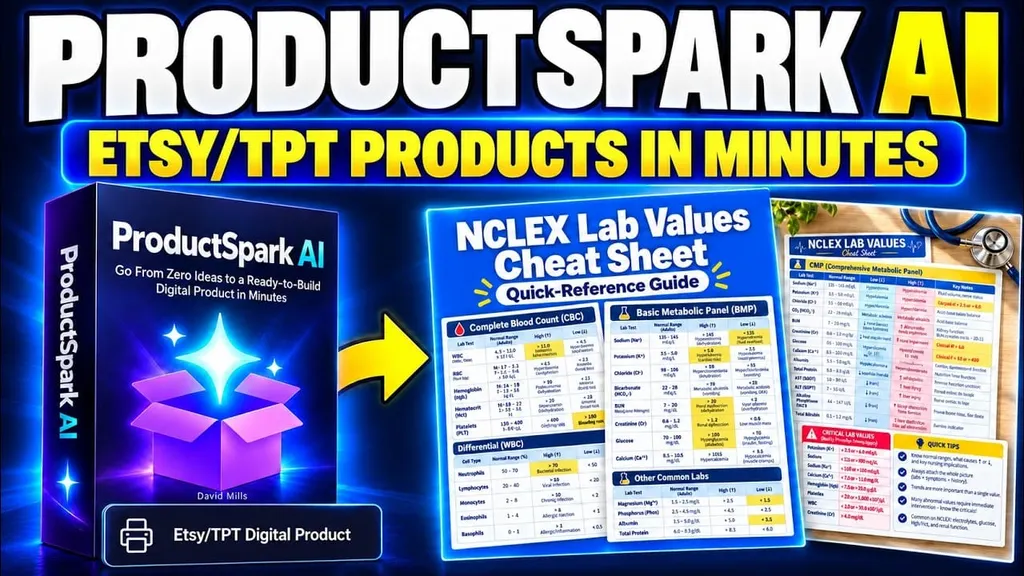
The example developed into an NCLEX lab values cheat sheet. Instead of trying to cover all of nursing school, it focuses on a particular reference need.
That’s the approach I prefer: start broad enough to discover opportunities, then get specific enough to create something useful. A product has a clearer purpose when I can explain who needs it and what task it helps them complete.
Check Demand Before Building Everything
I checked keyword research and Etsy search suggestions before moving further. The keyword tool showed roughly 400 searches for an NCLEX cheat sheet term. Its broader NCLEX report showed about 1,500 generated questions and around 50,000 in search volume.
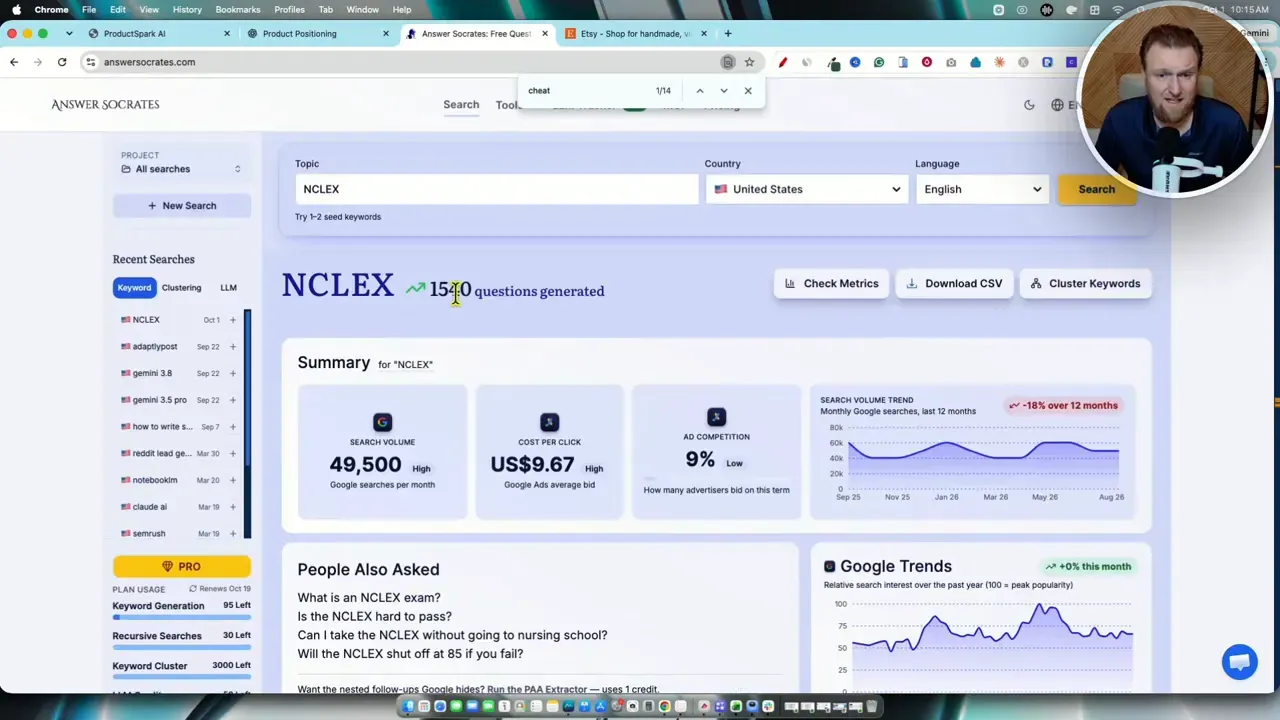
I treat those figures as research signals, not sales forecasts. The broader NCLEX search volume is not the same as demand for one particular printable, and search interest alone doesn’t tell me whether a new listing will convert.
Etsy’s suggestions also surfaced related phrases such as study guides, study plans, study planners, and templates. Those phrases help me understand how people describe the resources they’re looking for.
For a deeper look at keyword research, my Semrush review covers a dedicated research tool. I’d keep the distinction clear between general web search data and marketplace-specific demand.
Choose the Marketplace That Fits the Buyer
The new module groups Etsy and Teachers Pay Teachers together, but that doesn’t mean every product belongs on both.
For the nursing school project, the AI recommended Etsy. I agreed with that positioning. TPT is more closely associated with classroom resources for teachers, parents, and school-age students, while this particular guide targets nursing students.
I wouldn’t treat that as a rigid rule about everything either marketplace allows. It’s a practical audience-fit decision for this example.
The underlying files could also become part of a Shopify store or a WordPress website. ProductSpark AI’s marketplace module helps shape the product, but it doesn’t lock the finished resource to one storefront.
If I wanted more control over selling digital products outside a marketplace, my ProductDyno review explores a separate tool for creating and protecting digital product offerings.
The Master Prompt Builds the Product in Stages
The strongest part of this workflow is that it doesn’t jump straight from a niche to a short document.
After selecting the Etsy and TPT product type, entering the topic, and choosing settings such as complexity, I get a detailed master prompt. I copy that into my chosen AI assistant and work through a staged process.
Stage 1: Product Positioning
The first stage examines the audience, the product’s purpose, possible titles, and marketplace fit. For the nursing guide, that means considering what nursing students need from a lab values reference and how to describe the product clearly.
I like doing this before generating pages. Otherwise, it’s easy to end up with lots of content but no clear reason for someone to buy it.
Stage 2: Product Structure
Next comes the package itself: page organization, formats, sizes, and the components that make sense for the resource.
This is where I can approve the recommendations or trim the scope. If I only want a US Letter color guide and a black-and-white version, I can say so rather than creating every suggested variation.
Stage 3: Content Creation Roadmap
The third stage maps out the material that will go into the product. Once I approve that direction, I ask the AI to build and format the final files.
In my example, I declined extra bonuses and focused on producing the core guide. That keeps the project manageable and avoids adding material just to make the bundle look bigger.
The value is the sequence: positioning first, structure second, content development third, and final packaging after that. A simple one-line request can produce a cheat sheet, but this process gives me more opportunities to steer the result.
What the Finished Digital Product Looked Like
The AI returned a ZIP package containing seven files. The deliverables included a full seven-page guide, US Letter materials, and two-page color and black-and-white versions.
The guide had color-coded sections, reference tables, and organized explanations. Its lab values content covered items such as sodium, potassium, chloride, creatinine, glucose, and calcium.
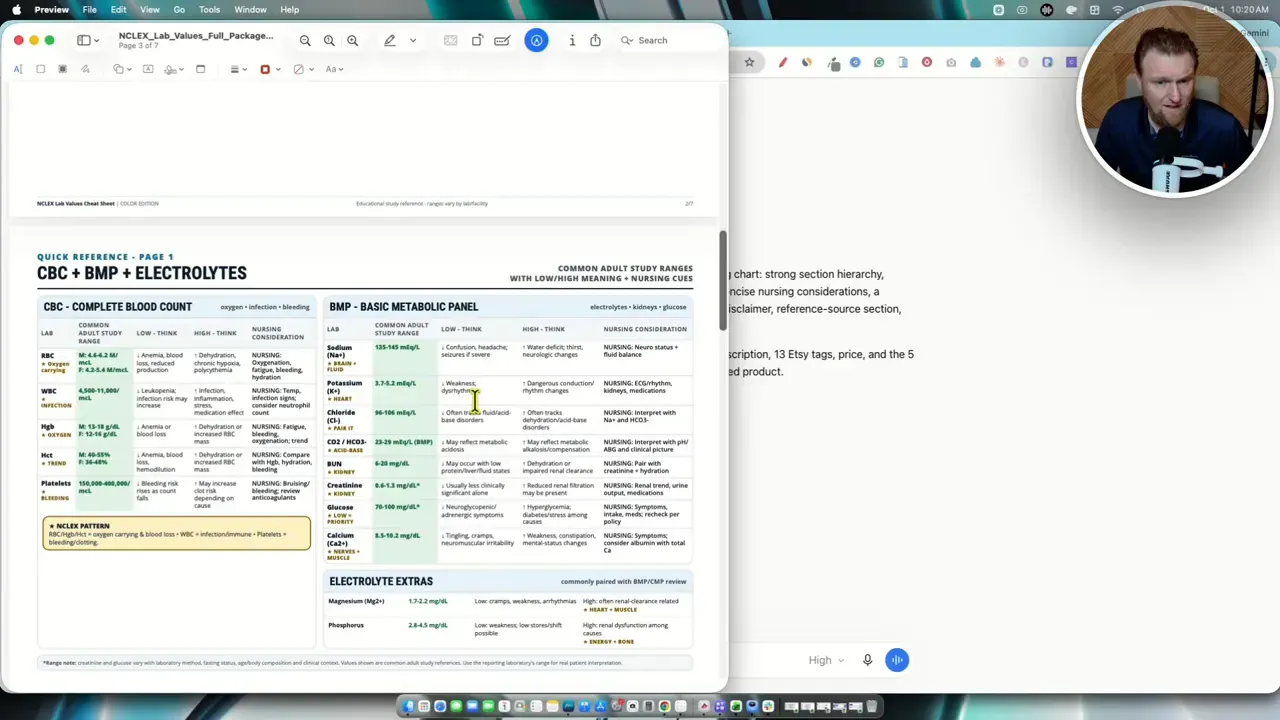
Visually, this was much closer to a packaged educational resource than a plain block of AI-generated text. The layout made the material easier to scan, which is important for a quick-reference product.
Still, a polished PDF proves formatting quality, not factual accuracy.
Because this example involves nursing education, I would verify the content against authoritative references and seek qualified review before selling it. The workflow included references to sources such as MedlinePlus laboratory test information, but source references alone don’t validate every generated table, measurement, or explanation.
I’d also open every file, check page breaks, inspect the text at a readable size, and confirm that the bundle matches the description. I want the buyer to receive a resource that works, not just one that looks good in a preview.
Create Etsy and TPT Listing Mockups
A finished PDF is only part of a marketplace listing. I also need an image that communicates what the product is and makes the listing look appealing.
The graphics upgrade now includes Etsy and TPT listing mockup options. I can build from a saved product rather than re-entering the entire project.
The workflow is straightforward:
- Open the graphics module.
- Choose the saved product project.
- Select the marketplace mockups I need.
- Choose a color palette and add any extra instructions.
- Generate the graphics prompts.
- Paste each prompt into an image-generation tool.
The presets shown in this example specify 3,000 × 2,250 pixels for Etsy and 750 × 750 pixels for TPT. Those are the sizes built into the demonstrated workflow, rather than a promise that platform guidance will never change.
I selected the Cobalt and Citrus palette and generated both prompts. That prompt-generation step took about 30 seconds, and I saved the results to the Kit Library.
The Etsy Mockup
The Etsy image presented the cheat sheets in a styled desk scene, with blue and yellow accents and a prominent title area across the bottom.
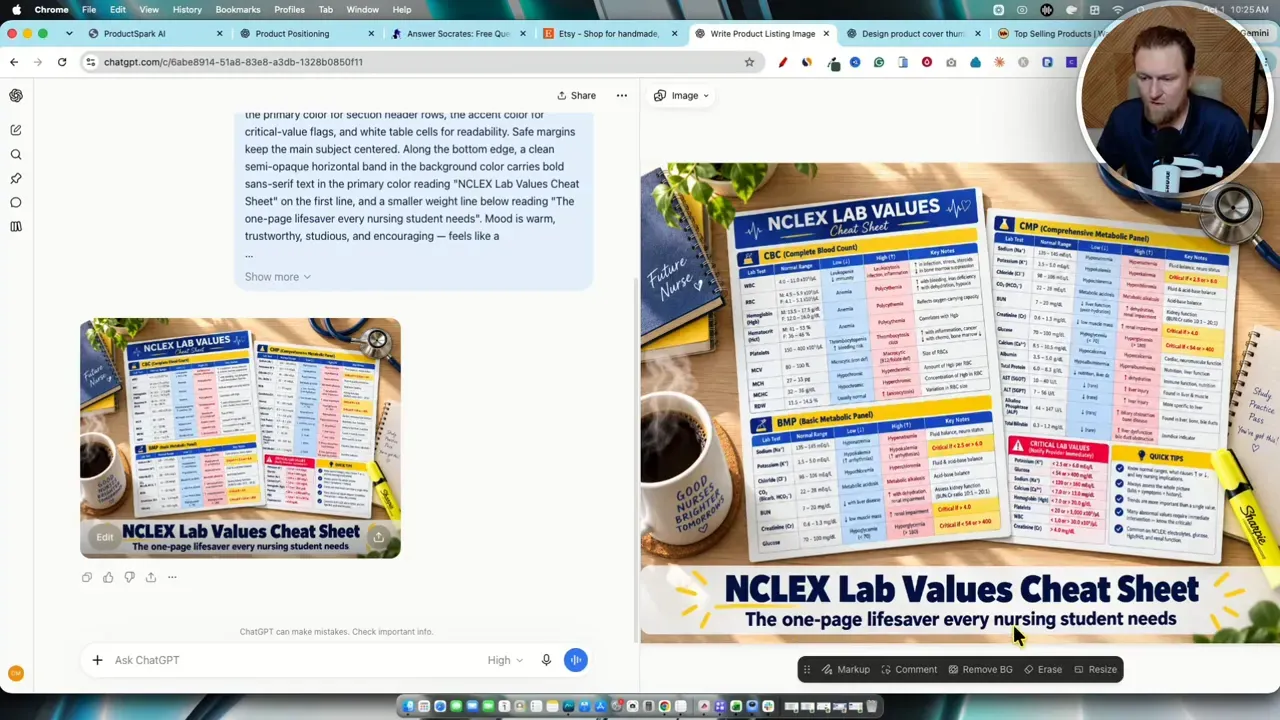
What I liked was how quickly the image communicated the product category. It looked like a study resource, and the layout gave the title room to stand out.
The TPT Mockup
The TPT version used a square composition, a strong blue background, and a more direct quick-reference presentation.
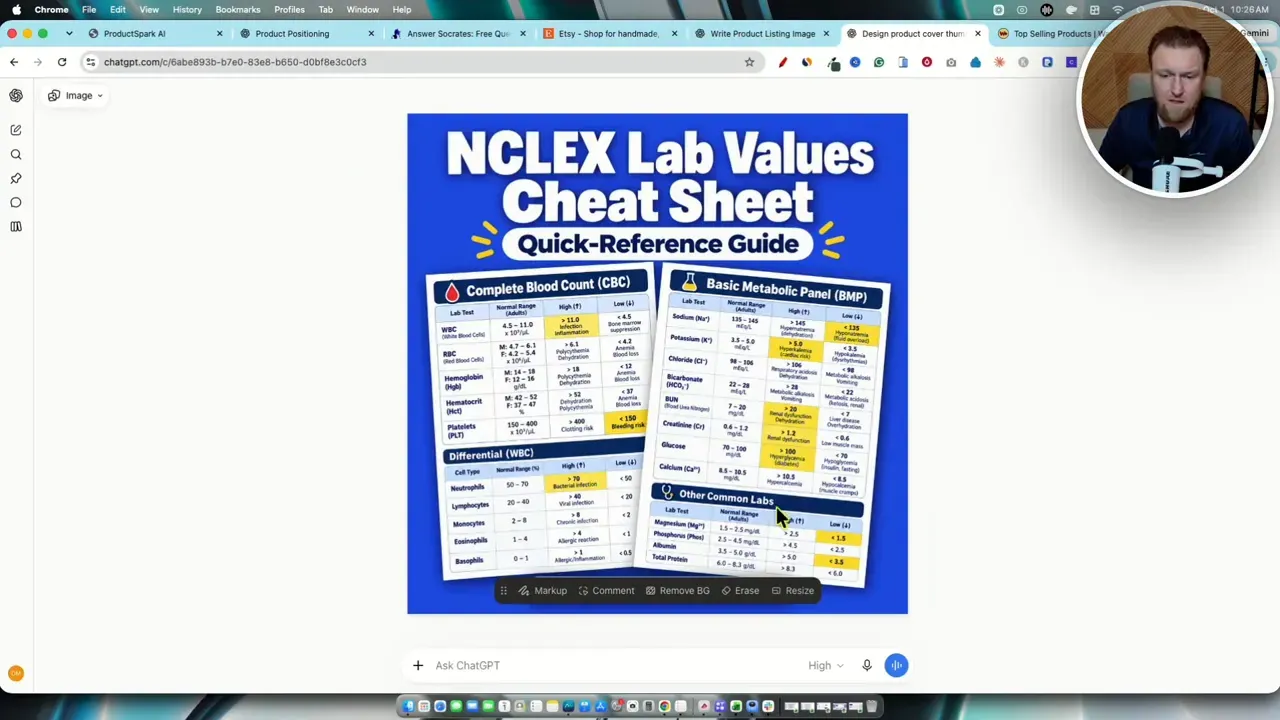
I could ask an image tool to resize one design for another platform. But separate prompts also let me create different presentations while keeping the same general color scheme.
There is one important limitation: the generated page previews didn’t exactly reproduce the actual PDF. Before publishing, I’d use screenshots of the real pages and ask the image tool to replace the illustrative previews.
I want attractive mockups, but I also want them to represent the actual download. The same goes for page-count claims or text implying a one-page resource when the package contains several different files.
Turn the Product Conversation Into Listing Copy
Once the product is complete, I can keep using the same AI conversation to draft the listing.
That conversation already contains the audience, positioning, structure, and contents. I don’t need to explain the whole project again to ask for:
- An Etsy product title
- A product description
- Relevant keywords
- Separate TPT listing copy, if appropriate
I would request marketplace-specific versions rather than assuming identical copy fits both audiences.
Then I’d compare every claim with the finished package. The title, description, and images should agree on what’s included, which formats are available, and who the resource is for.
For platform-specific guidance beyond the AI-generated draft, I’d consult the Etsy Seller Handbook. ProductSpark AI helps prepare the assets, but I still need to check the marketplace’s current requirements.
Build a Promotion Plan After the Listing Is Ready
The workflow doesn’t have to stop at listing creation. The graphics module also includes a Pinterest pin option, so I can create promotional images connected to the saved product.
One simple approach is to generate a pin prompt, then ask for additional variations. That gives me several creative directions without starting from scratch each time.
The traffic upgrade goes further. Its options include:
- A YouTube video plan
- An Instagram Reels plan
- A 30-day Pinterest plan
For this project, I selected the Pinterest plan, kept the Cobalt and Citrus palette, and used the destination-link field for the product listing. The same approach can point toward Etsy, TPT, or an independent store.
The upgrade also included two approximately 30-minute training videos about selling digital products. I see the distinction this way: the graphics tools help create promotional assets, while the traffic tools help organize a broader promotion plan.
Neither replaces execution. I still need to publish the content, bring people to the listing, and assess whether the offer is connecting with the intended audience.
Pricing, Upgrades, and Practical Limits
During the launch promotion, the base ProductSpark AI offer was advertised at under $10. The graphics upgrade was $14.95, with that promotional price stated to run until October 4. Those are launch details, not guaranteed current prices.
The base software was presented without subscription charges or credits, using a license key rather than a conventional login. However, this example also relies on external AI tools. I would check their access requirements and usage limits separately.
I can check the current ProductSpark AI offer for the available packages and pricing.
Disclosure: ProductSpark AI is my own software, so this is a hands-on explanation of the workflow I built, not an independent review. This article is not sponsored by the other brands mentioned. Some links may be affiliate links, which can earn me a commission at no additional cost to the buyer.
My Verdict: Helpful for Production, Not a Profit Guarantee
ProductSpark AI can help move an Etsy digital product from an initial niche to a structured guide, downloadable files, mockup prompts, listing copy, and a promotion plan.
The biggest benefit, in my view, is reducing the repeated planning and prompting involved in each stage. I can save projects, reuse their context, and keep the product and promotional assets connected.
But profitability remains a separate question. This nursing cheat sheet example demonstrates production, not proven revenue from the finished listing.
My approach would be to start with one focused product, validate the topic, review the files carefully, create accurate previews, and publish with a promotion plan. Then I’d use the response to improve the offer before building a larger catalog.
I’d use ProductSpark AI to speed up the work, not to skip the judgment that makes a product worth buying.