

Email gets messy fast.
One minute I am handling a few normal messages. The next minute I am buried in promo emails, collaboration requests, support threads, outreach pitches, and random stuff that probably never needed my attention in the first place. That is exactly where a tool like Snoooz AI tries to help.
Snoooz is built as an AI email assistant that can categorize, route, and draft replies inside your inbox. Instead of manually deciding what deserves a response, it tries to do that triage for you. It also gives you templates, custom rules, and automation options so you can speed up repetitive replies without fully handing over control.
If your inbox feels like a second full-time job, this kind of software is easy to get curious about.
Table of Contents
- What Snoooz AI is supposed to do
- The first thing that stood out: inbox triage
- Why this matters even more for collaboration and outreach emails
- Setup is pretty straightforward
- The rule system is where Snoooz gets more powerful
- Templates can save a lot of repetitive work
- You can create custom categories for your actual workflow
- Data sources give the AI more context
- Draft replies feel like the safest sweet spot
- Pricing starts low, which makes it easier to test
- Where Snoooz seems strongest
- Potential limitations to keep in mind
- Who I think Snoooz is best for
- The bigger takeaway: this is a good use of AI
- Final verdict
What Snoooz AI is supposed to do
At a basic level, Snoooz is trying to solve one problem: too many emails, not enough time.
It connects to Gmail, Outlook, Google Workspace, and other email accounts through IMAP. There is also a Chrome extension that helps it work directly with Gmail. Once connected and activated, it starts analyzing incoming messages and sorting them into buckets.
Those buckets can include categories like:
- Needs reply
- Urgent
- FYI
- Notifications
- Promotional
That alone is useful. If I can open email and immediately focus only on the messages that actually deserve attention, I am already saving time.
But Snoooz goes further than labeling. It can also:
- Draft replies automatically
- Use AI to generate a helpful response
- Apply templates for common situations
- Forward or route emails
- Send auto follow-ups
- Train responses using uploaded docs or website content
So this is not just inbox cleanup. It is really a lightweight AI workflow layer for email.
The first thing that stood out: inbox triage
The biggest selling point here is not actually the auto replies. It is the automatic sorting.
After setup, new emails start getting labeled as they come in. The tool does not appear to heavily backfill old messages by default. It is more about handling things from the moment you turn it on.
That matters because most inbox problems are not just about writing. They are about decision fatigue.
Every time I open email, I am asking the same questions over and over:
- Do I need to answer this?
- Can I ignore it?
- Is this a sales pitch?
- Is this a legit opportunity?
- Should this wait until later?
Snoooz tries to answer those questions upfront. In the demo, incoming messages were automatically marked as promotional, notifications, or needs reply. That means the inbox becomes less of a messy stream and more of a prioritized queue.
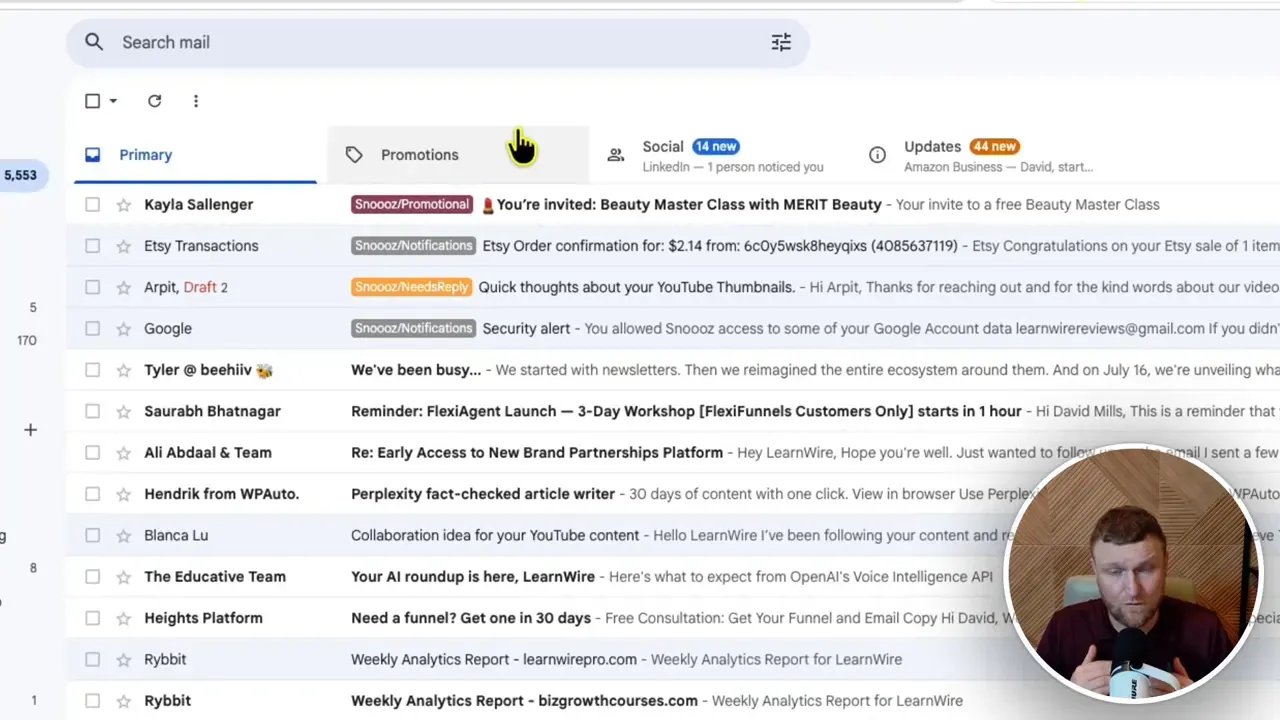
For a lot of people, that is probably the main value right there.
If you run a business, manage client communication, or deal with affiliate and partnership outreach, that kind of sorting can reduce a lot of mental clutter.
Why this matters even more for collaboration and outreach emails
One of the more practical use cases shown was dealing with collaboration requests.
That is a great test case because outreach emails are all over the place. Some are obvious spam. Some are low-quality pitches. Some are real partnership opportunities. Some are just services being sold, like thumbnail help or cold outreach offers.
Without any filtering, it is easy to either:
- Miss good opportunities
- Waste time answering bad ones
- Let everything pile up until you stop checking
Snoooz seems helpful here because it can identify which messages likely need a response and place them into a dedicated folder. That makes it easier to review serious inquiries without getting distracted by the rest.
And if you already know your standard answer to a common pitch, you can build a template once and reuse it over and over.
If email outreach is part of your business, this could fit nicely alongside broader automation systems. If that is an area you are exploring, the AI Software Workflows community is relevant because it focuses on figuring out which AI tools are actually worth adding to your stack.
Setup is pretty straightforward
The setup process looked refreshingly simple.
The main steps were:
- Install the browser extension or connect through the available integration
- Add your inbox
- Enable the mailbox so it becomes active
- Let Snoooz start organizing new incoming messages
There are several connection options available, including Gmail, Outlook, and IMAP for custom email providers. There are also extension and app options for Outlook, Chrome, and even MCP related integrations.
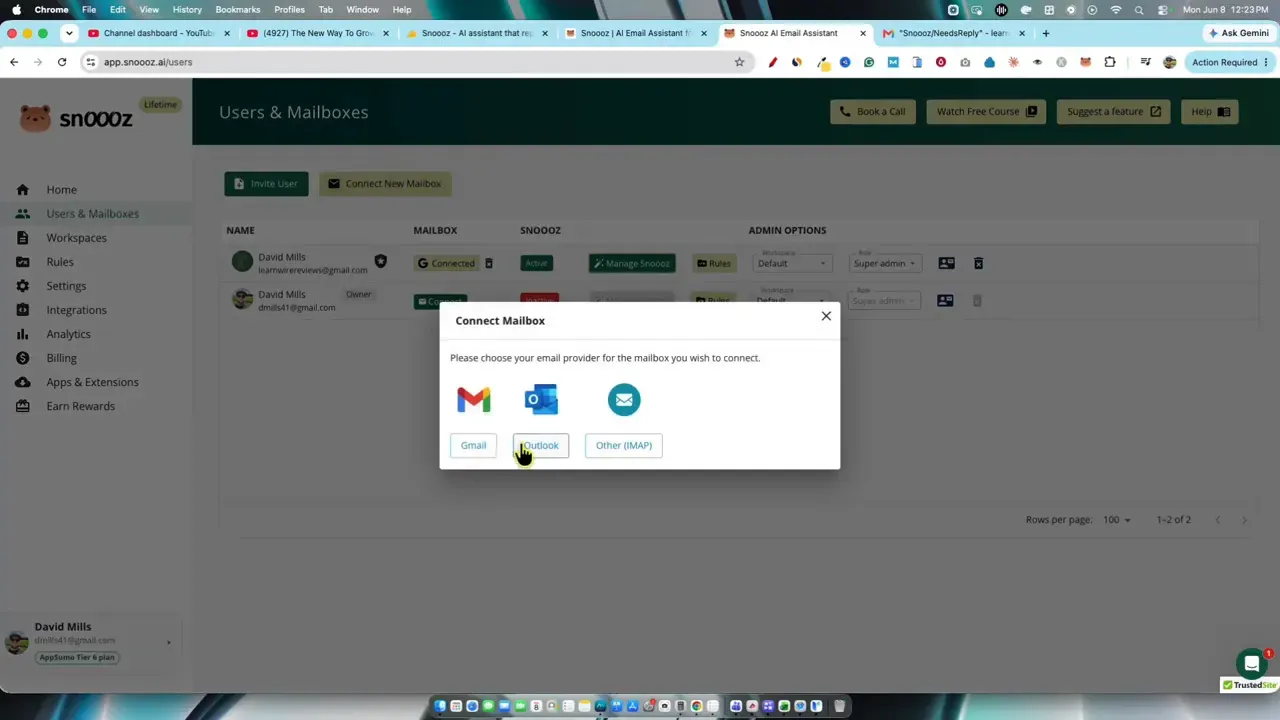
One nice detail was the support experience. When an inbox was connected but still inactive, support replied almost immediately with a helpful fix. Fast support matters with tools like this because email integrations can become frustrating if one small setting blocks the whole thing.
That quick support response is a small detail, but it made the product feel more polished.
The rule system is where Snoooz gets more powerful
If you only use Snoooz for automatic categorization, it already seems useful.
But the deeper value comes from its rules engine.
Inside the admin area, you can edit categories and decide what happens when an email matches that category. For example, a rule can be set to:
- Draft a reply
- Send a reply automatically
- Forward the message
- Apply a label
You can also tweak things like:
- Reply all behavior
- Email signatures
- Whether to keep the previous thread
- Branding removal
- Conversation mode
- Auto follow-ups
That level of control is important because not all inbox automation should be treated the same.
I would not want a promotional email to get an auto response. I might want a collaboration inquiry to get a draft reply only. I might want support requests routed differently from affiliate requests. Snoooz seems to understand that email automation has to be flexible, not one-size-fits-all.
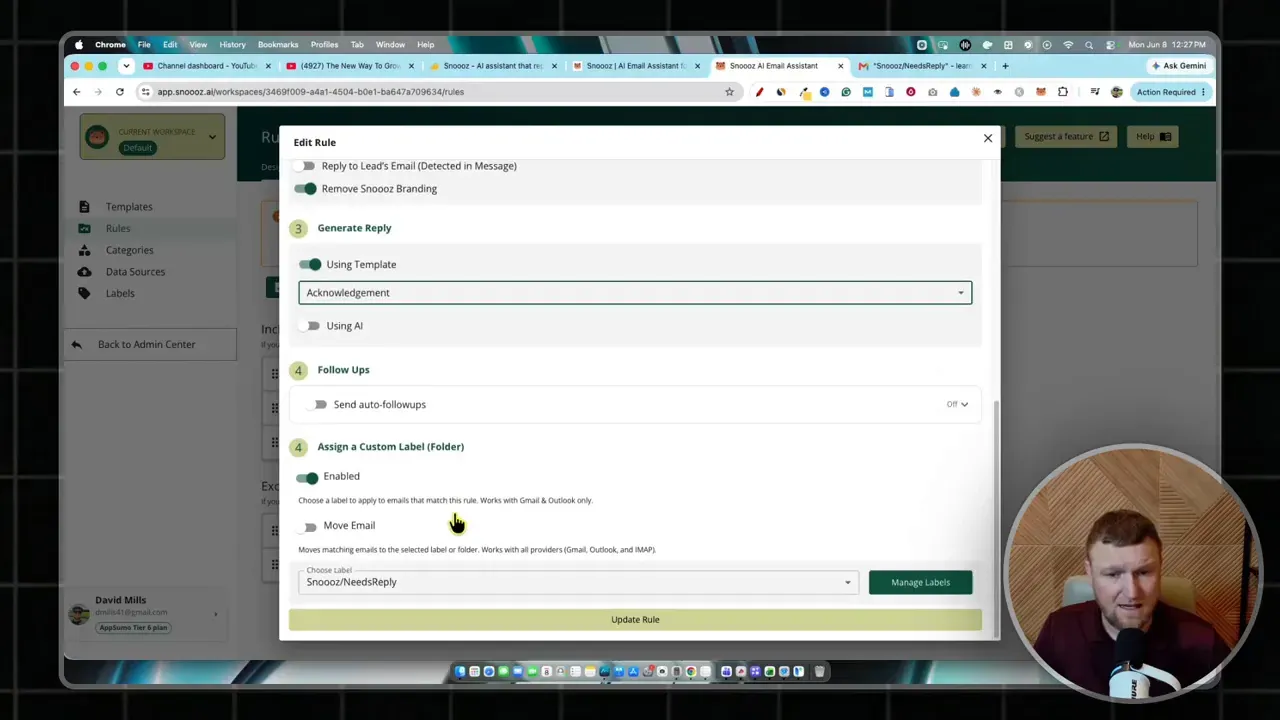
This is where the platform starts to feel more like workflow software than a simple email plugin.
Templates can save a lot of repetitive work
Templates are another big piece of the system.
If your inbox contains the same few types of conversations again and again, templates can do a lot of heavy lifting. Instead of drafting from scratch every time, you can build standard responses for common situations.
Examples might include:
- Initial collaboration replies
- Affiliate partnership responses
- Turning down service offers politely
- Requesting more information before moving forward
- Basic support acknowledgments
The template builder includes dynamic fields like the sender name, which makes canned replies feel a little more personal.
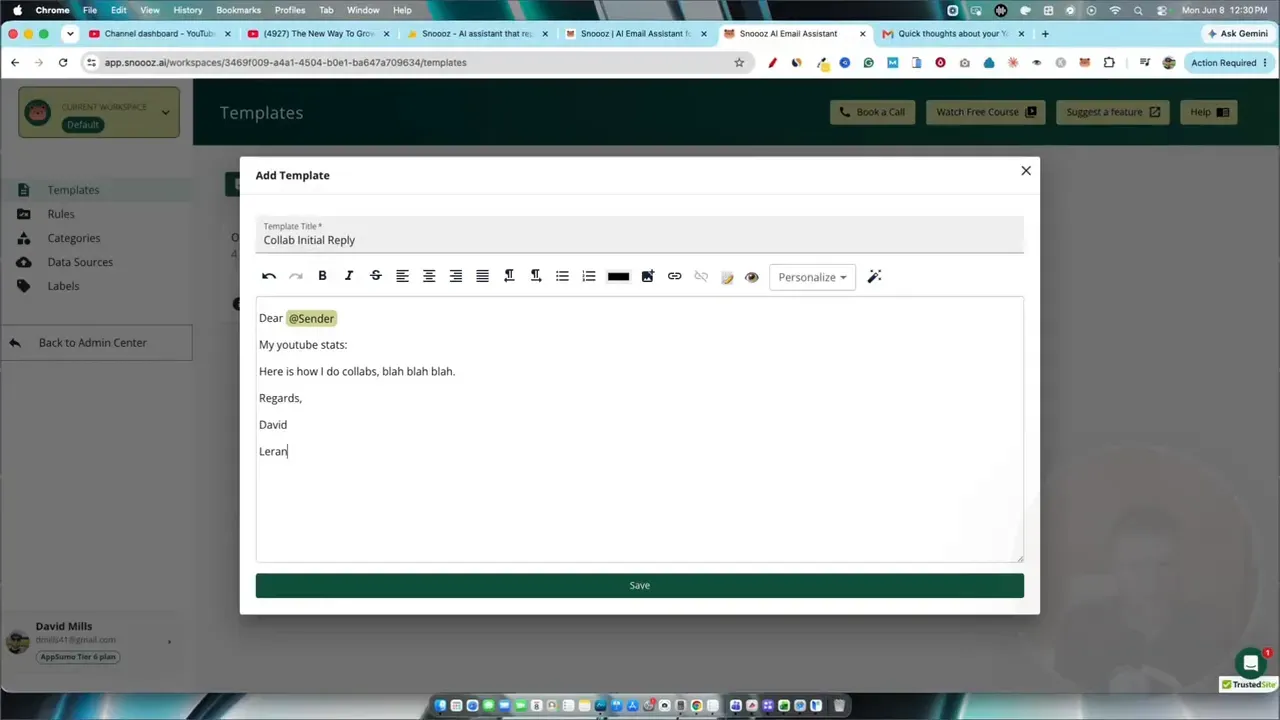
This matters because the best email automation usually lives in the middle ground. I do not want to type the same response 50 times, but I also do not want every reply to sound robotic. Templates help bridge that gap.
If you are comparing other AI writing and response tools for this kind of work, I would also look at broader tools like Voila for productivity-focused writing help and ChatSonic if you want a more general AI assistant.
You can create custom categories for your actual workflow
This is one of the better features.
Instead of relying only on default labels like urgent or promotional, Snoooz lets you make your own category. In the demo, a custom category was created for collaboration opportunities. That category could include a description, example emails, and keywords such as collaboration, partnership, affiliate, or review.
That is smart.
AI tools perform much better when you give them context. If you tell the system exactly what a category means and provide examples, you increase the odds that it will classify incoming messages correctly.
For someone in content, SaaS, consulting, or affiliate marketing, custom categories could be built around things like:
- Media requests
- Sales leads
- Refund requests
- Software demos
- Partnerships
- Guest post inquiries
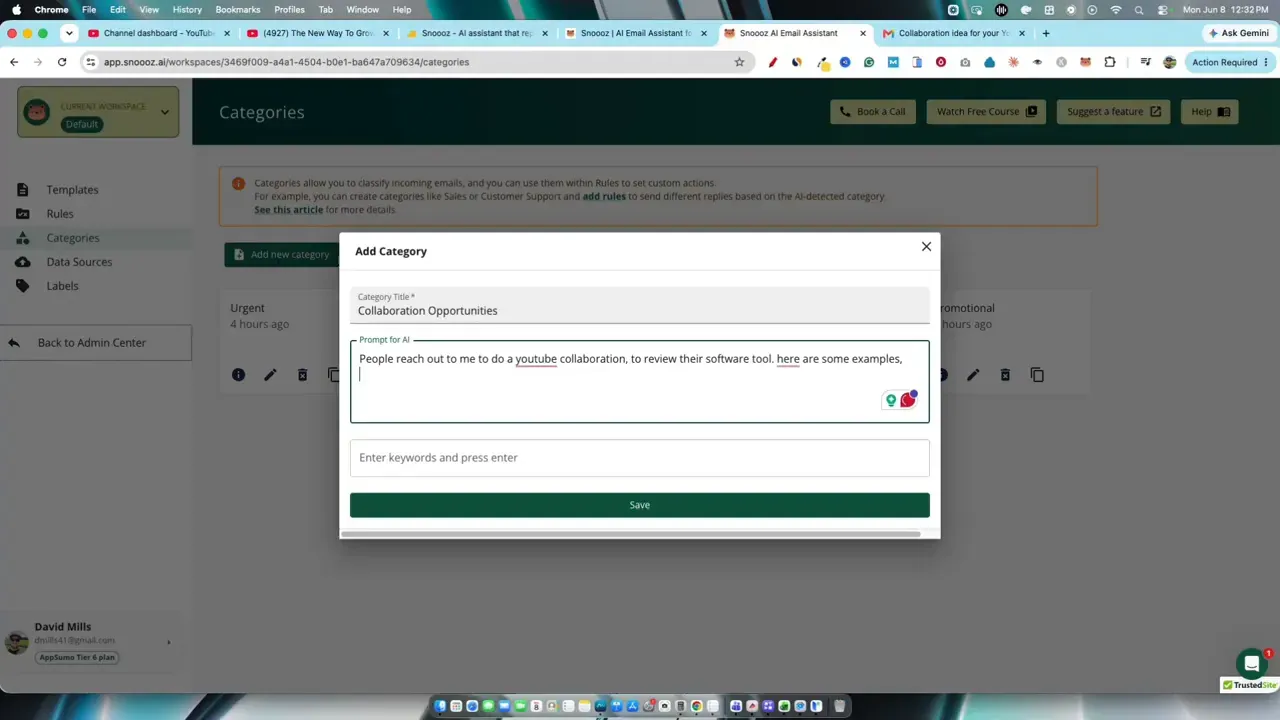
This is also where the tool starts moving from generic email assistance into something more tailored to how I actually work.
Data sources give the AI more context
Another useful feature is the ability to feed the system more information.
Snoooz lets you add data sources such as:
- Website pages
- PDFs
- Other documents
The goal is to train the AI so its replies are based on real context from your business or content.
That could be valuable for support teams, product businesses, coaches, or agencies. If your email assistant can reference your policies, service details, product docs, or offer information, the replies should become more relevant.
This is a similar idea to how retrieval works in many modern AI workflows. If you want a strong general explanation of that concept, Anthropic has useful documentation on AI workflows and prompt context.
Of course, the quality still depends on how well the system interprets and uses those sources. But the option is there, and that is better than relying on generic AI guessing.
Draft replies feel like the safest sweet spot
One thing I liked about the overall approach is that Snoooz does not force full automation.
Yes, it can automatically reply in some cases. But the strongest use case seems to be draft first, human approve second.
That is the sweet spot for AI email tools.
Why? Because full autopilot in email can get risky fast. Tone matters. Relationships matter. Context matters. One wrong reply can create confusion or make you sound careless.
Drafting is different. If the AI gives me an 80 percent complete response, I can clean it up in seconds and still keep control.
That is a huge improvement over either extreme:
- Writing every message from zero
- Trusting AI to send everything without review
Snoooz also includes an option to improve a draft, which suggests alternate wording. That is nice if the first draft feels a little off.
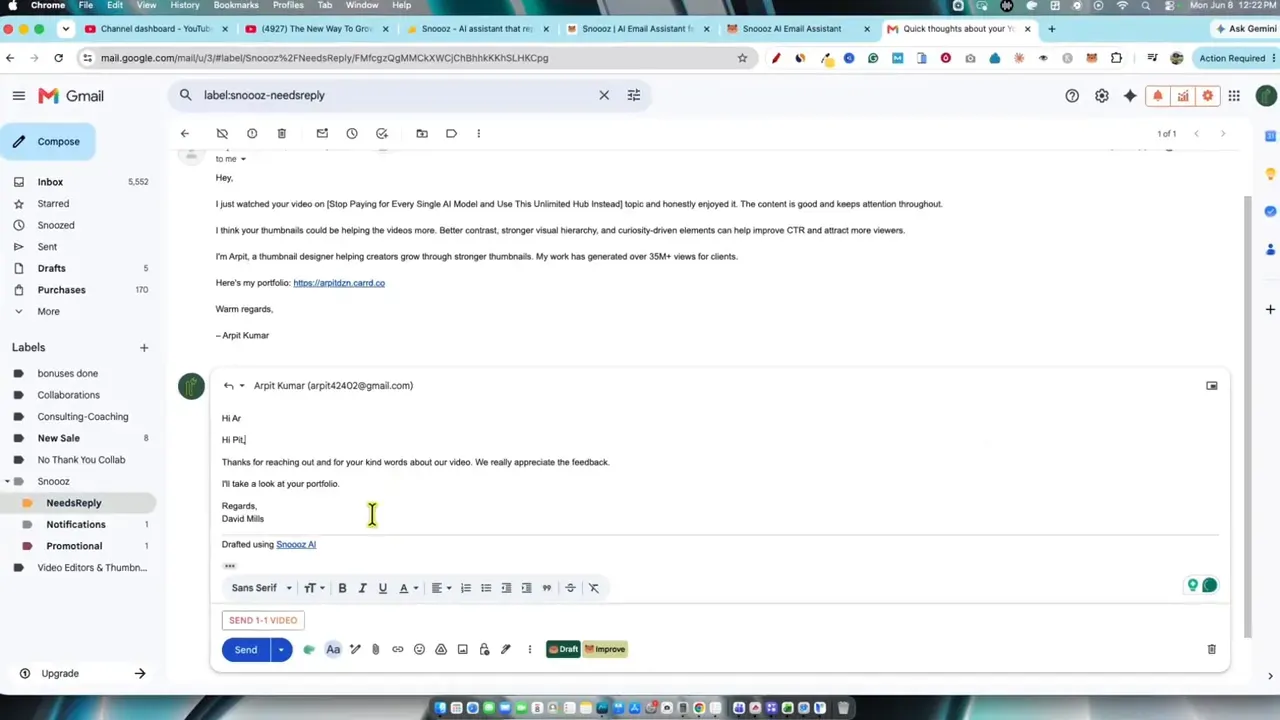
One practical tweak that came up was removing the tool branding from replies. That was easy to switch off, which is good because most people do not want AI tool branding attached to normal business communication.
Pricing starts low, which makes it easier to test
Pricing was another pleasant surprise.
The starting license tier came in at $39, with higher tiers moving up from there. Compared to a lot of newer AI tools, that feels relatively approachable, especially if all you really want is one connected inbox and better organization.
Higher tiers unlock more inbox users, more AI credits, and support for more models. Some higher plans also include extra capabilities like unlimited credits and larger model access.
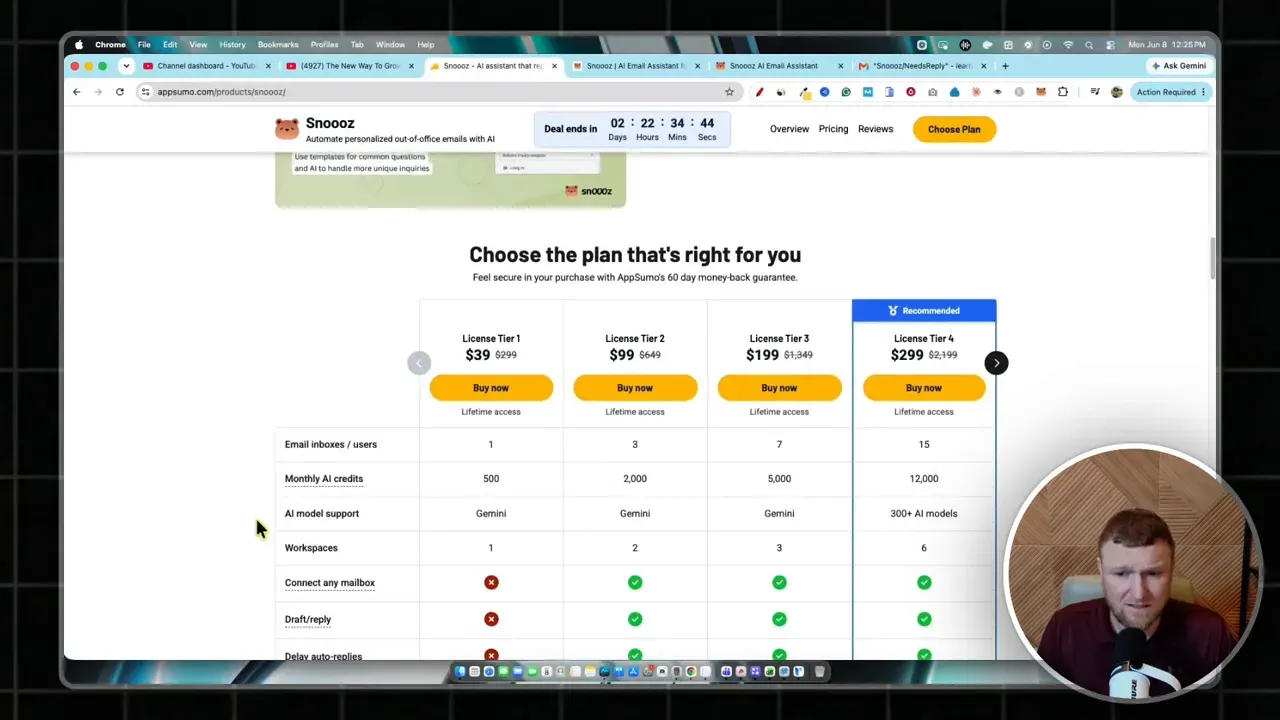
That pricing structure matters because not everyone needs an enterprise-level setup. A solo creator, freelancer, consultant, or small business owner might get enough value from the lower tiers.
If you want to check the deal directly, you can use the Snoooz deal page.
Where Snoooz seems strongest
After looking through the full workflow, these are the parts I would call the biggest wins:
- Automatic categorization that helps reduce inbox chaos immediately
- Draft replies that keep a human in the loop
- Custom categories for matching real business use cases
- Template support for repetitive email situations
- Fast setup with common email services
- Quick support when something goes wrong
If all Snoooz did was separate important messages from junk and put possible replies in front of me, that would already be helpful.
Potential limitations to keep in mind
No AI email tool is perfect, and Snoooz is no exception.
A few things stood out as possible limitations:
- It seems more focused on handling emails from the moment activation starts, rather than deeply cleaning up past inbox history
- Classification accuracy will likely depend on good examples and rule setup
- Auto reply features can still be risky if used too aggressively
- Some workflows may require time upfront to build templates and tune categories
That last point is worth highlighting. Tools like this save time later, but they often require some thinking at the beginning. You get the best results when you invest a little time into rules, templates, and category design.
That is normal for automation. The same idea shows up in tools for SEO, content, and publishing. If you are interested in similar productivity gains on the content side, you might like my related reads on repurposing long-form content and turning videos into blog posts with AI.
Who I think Snoooz is best for
This tool looks especially useful for:
- Creators getting lots of partnership emails
- Founders managing a growing inbox
- Freelancers handling leads and client communication
- Small teams that need better email routing
- Consultants or agencies with repetitive inquiry responses
I think it is less compelling for people with very light inbox volume. If your email is already manageable, Snoooz might feel like overkill.
But if your inbox constantly turns into a to-do list you never finish, that is where it starts making sense.
The bigger takeaway: this is a good use of AI
What I like most about Snoooz is the philosophy behind it.
This is not AI trying to replace judgment completely. It is AI helping with the annoying repetitive parts so I can spend time on the messages that actually matter.
That is the kind of AI workflow I tend to trust most.
It speeds up:
- Sorting
- Prioritizing
- Drafting
- Reusing common responses
But it still leaves room for me to make the final call.
That balance is important. Good productivity software should make me faster without making me careless.
Final verdict
Snoooz AI looks like a genuinely useful inbox productivity tool.
Its best feature is not flashy. It is the simple ability to look at incoming email and quickly decide what matters. Once that is handled, the templates, rules, categories, and drafts start stacking on top of that foundation.
If I had to sum it up, I would say this:
- If you want full hands-off AI email autopilot, use caution
- If you want a smarter inbox that helps you organize and respond faster, Snoooz looks promising
For me, the standout value is the way it identifies messages that probably deserve a response and puts them into a manageable bucket. That one feature alone can save a surprising amount of time every week.
And when you add template replies, category logic, and draft generation, it becomes a solid productivity upgrade for anyone drowning in email.
If you are exploring more AI tools for business, marketing, and productivity, you can also browse the main LearnWire software reviews hub or follow along for updates on building in public.