Rybbit Review: A Simplified Google Analytics Alternative That Tracked Users in Real Time


I tested Rybbit and walked away impressed. If you want an analytics tool that skips Google complexity, gives you live user data, and is dead simple to install, Rybbit deserves a look. I installed the script on both Ghost and WordPress, watched visitors light up on the dashboard within seconds, and found features that make analysis approachable for creators who hate hunting through Google Analytics menus.
Table of Contents
- What Rybbit is and why it matters
- Pricing and license tiers (quick summary)
- First impressions of the dashboard
- Installing Rybbit: Ghost was effortless
- Installing Rybbit on WordPress
- Real-time tracking: the “instant feedback” experience
- Key analytics features that I found useful
- Performance and web vitals
- Funnels, goals, and user journeys — how granular can you get?
- Behavior and sessions: the user-level view
- Where Rybbit could improve
- Who Should Use Rybbit?
- My verdict: practical, fast, and friendly
- Quick checklist before you install
- Further reading and tools I recommend
- Final thoughts
What Rybbit is and why it matters
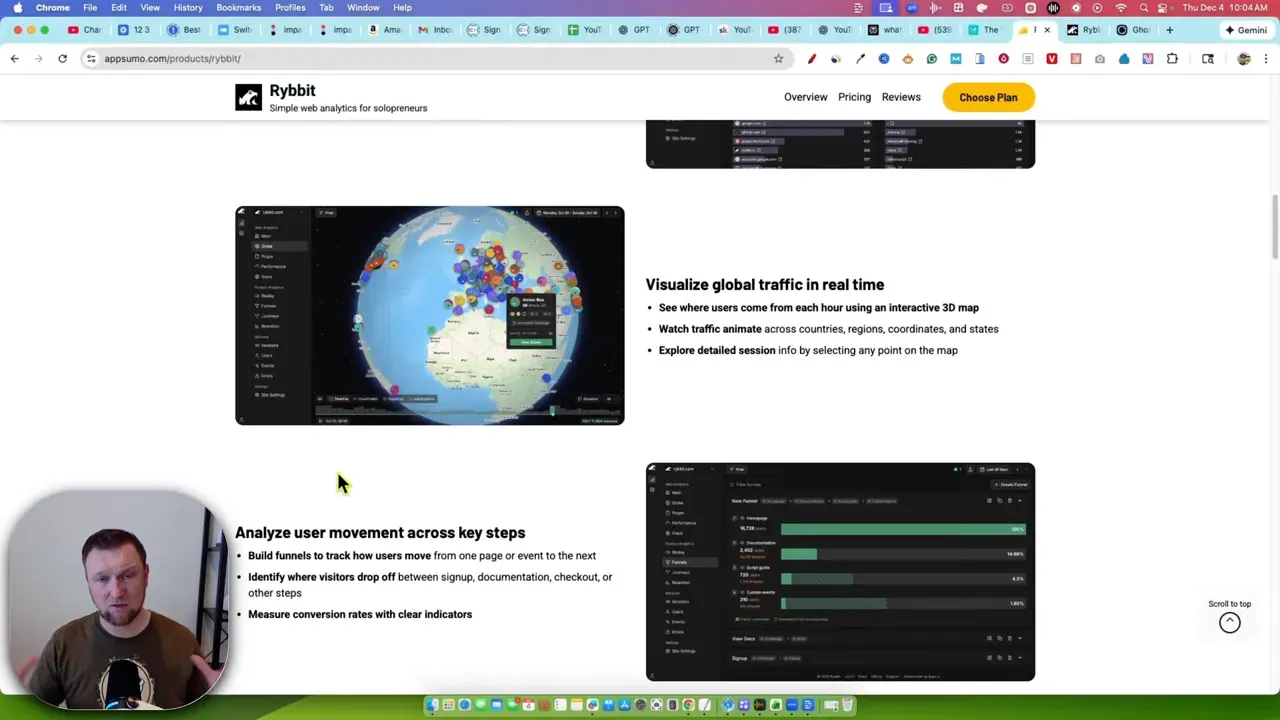
Rybbit is a lightweight website analytics platform that aims to replace or complement Google Analytics. It tracks page views, referrers, sessions, user journeys, and core web vitals, and then presents that data in a friendly, visual dashboard. The selling point is speed and clarity: real-time tracking, a globe view of users, and easy-to-read pages and sessions. If you dread Google Analytics and want something you can actually use, Rybbit is worth testing.
Pricing and license tiers (quick summary)
Rybbit launched with a few AppSumo lifetime deal tiers. The tiers are straightforward:
- Tier 1 — $49: 3 websites, up to 20,000 visitors per month, 1 user.
- Tier 2 — $129: 10 websites, up to 100,000 visitors per month, 3 users.
- Tier 3 — $279: 25 websites, up to 250,000 visitors per month, 10 users.
The platform includes web vitals, funnels, goals, error tracking, journeys, user profiles, and basic data retention out of the box. The main constraint to watch is the page view cap per license. If one of your sites is getting most of the traffic, the total allotment can be consumed quickly.
First impressions of the dashboard
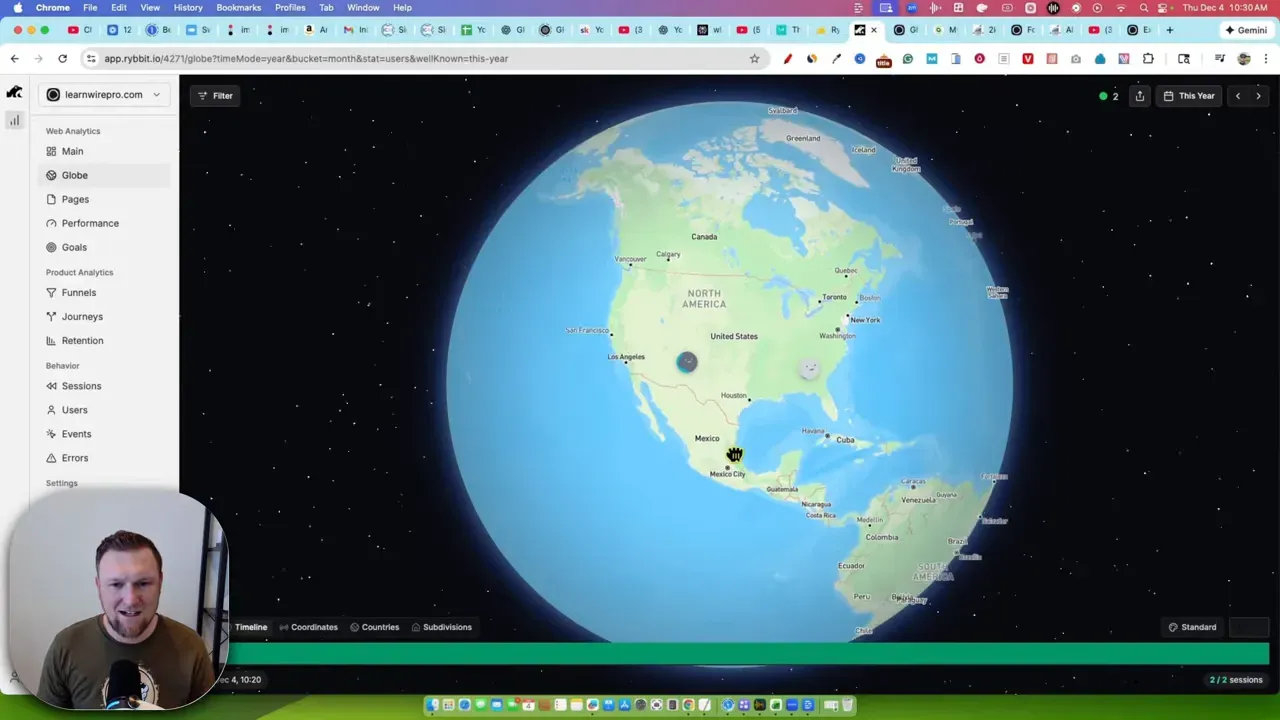
The dashboard is organized and responsive. A left-hand menu gives access to sites, public analytics, performance, and behavior. One of the things that hooked me immediately was the globe view that shows live users mapped across the world. It's fun and actually useful when you want to understand geographic distribution at a glance.
Installing Rybbit: Ghost was effortless
I copied the snippet from Rybbit, went into Ghost's settings, and pasted the script into the code injection area. It was three clicks and a save. Ghost handles code injection cleanly, so you don't need an extra plugin. After saving, I refreshed the Rybbit dashboard and immediately started seeing page views register.
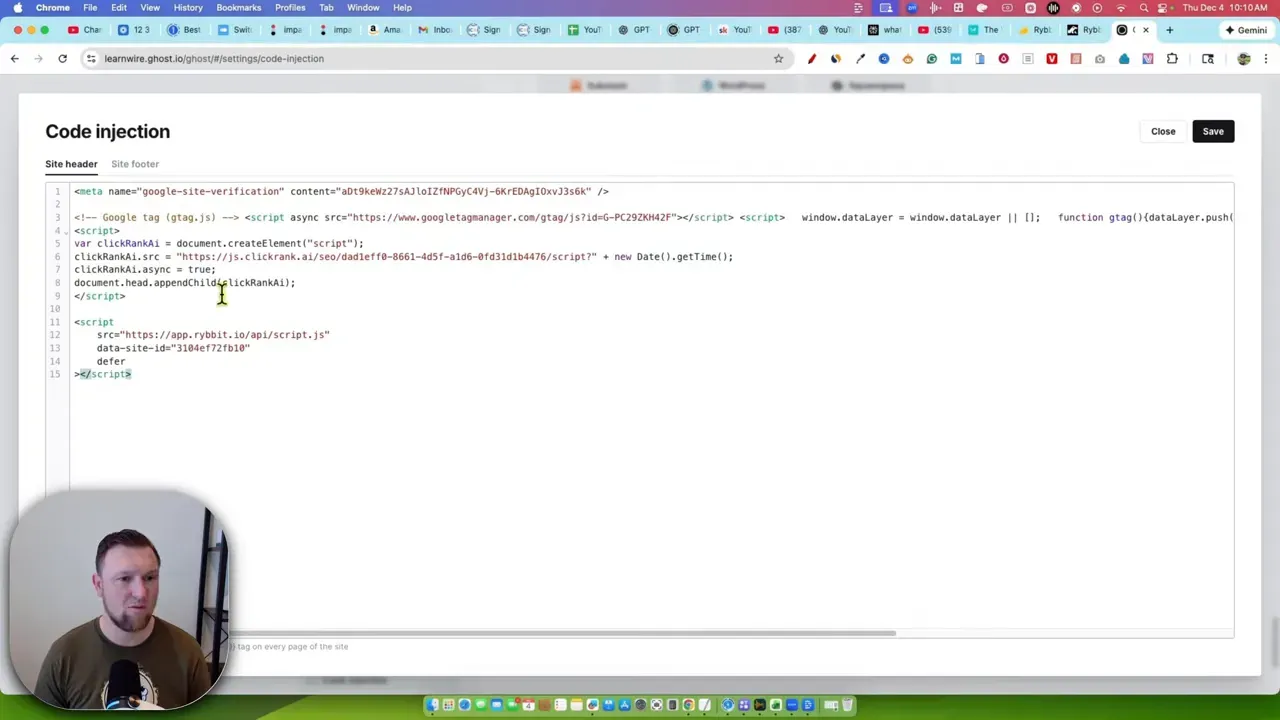
For anyone on Ghost, this is low friction. If you host on Ghost and want a simple tracker that doesn't bloat your site with plugins, Rybbit is a natural fit.
Installing Rybbit on WordPress
WordPress users have two straightforward options: add the snippet in your theme, or paste it with a header/footer plugin. I used the Header Footer Code Manager (HFCM) plugin and created a snippet labeled "Rybbit". Paste the code, save, and you're done.
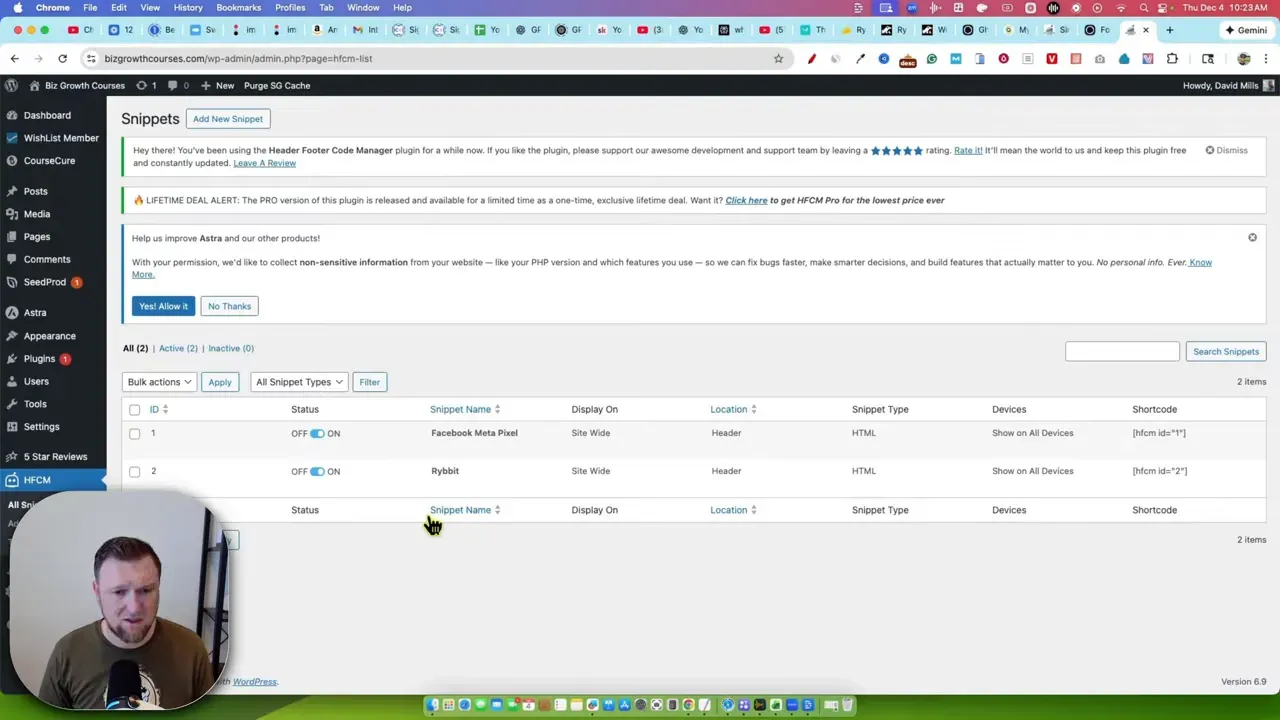
After installation I navigated a few site pages to validate tracking. Rybbit picked up page views and referrers instantly. If you're comfortable with a small plugin or theme edits, installation is painless.
Real-time tracking: the “instant feedback” experience
This is where Rybbit shines. After installing the script, I opened multiple pages on the tracked site and watched the dashboard update in real time. Page views, unique users, referrer sources, and even device details popped into the sessions and users sections within seconds.
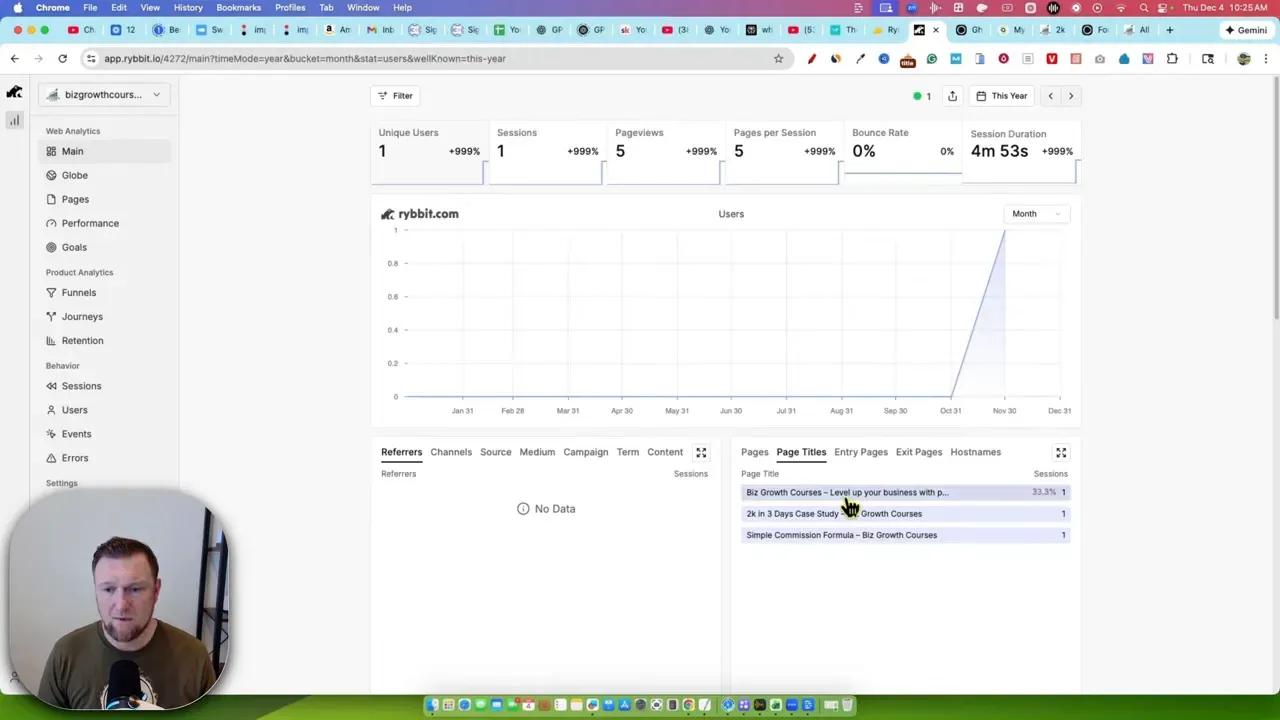
I saw a visitor arrive from Bing, then another from Google, and the dashboard showed entry pages, exit pages, session counts, browsers, and screen dimensions. You get an accurate sense of who is on your site right now and what they are doing.
Key analytics features that I found useful
- Live sessions and users: See who is on the site and what pages they’re visiting.
- Geographic mapping: Globe and map views show city-level data (useful for targeted promotions or timezone insights).
- Referrers and UTM support: Quick access to where traffic is coming from — Google, Bing, etc.
- Pages and entry/exit metrics: Popular pages surface immediately without digging through reports.
- Web Vitals: Core Web Vitals are available via an enable toggle to get detailed performance metrics.
- Funnels, goals, and journeys: You can create conversion goals, track funnels across pages, and visualize user journeys.
- Error tracking and events: Track JavaScript errors and custom events for debugging and conversion attribution.
Performance and web vitals
Rybbit collects core web vitals but you have to toggle the feature on. Enabling web vitals increases event usage, so if you're on a tight page view cap keep that in mind. For most sites, I recommend turning it on after you’ve verified traffic levels and want deeper performance insights.
Funnels, goals, and user journeys — how granular can you get?
Rybbit supports conversion goals and funnels. You can define page goals or event goals and even attach tracking to specific buttons so clicks register as conversion events. That means you can map a landing page to a course signup page, then to the checkout page, and track conversion rates along the way.
Journeys show multi-step behaviors like home → product → course pages. Retention graphs appear once you have enough historical data. Right now I didn't have enough traffic to generate deep retention insights, but the structure is there to grow into.
Behavior and sessions: the user-level view
If you like to dig into individual sessions, Rybbit offers session-level detail with device, browser, page path, and the number of views per session. Instead of abstract percentages, you can see someone’s exact path through your site. That makes troubleshooting and UX testing much easier.
Where Rybbit could improve
The main limitation is the page view cap across multiple sites. If you pick a tier and put 10 sites under it, the 100,000 monthly cap is shared. That means one high-traffic site can eat your allocation. For lifetime deal buyers who already have a high-traffic site, this may not be the best fit. Consider gap scenarios:
- If you already get >100,000 visits per month on a single site, the tier two lifetime deal could be limiting.
- If most of your traffic goes to one or two sites, you might blow past the cap quickly.
That said, if you’re at the stage where even tier two would be generous, you’re probably also making enough revenue to justify upgrading. I know creators who monetize effectively with 100k+ monthly visitors, so for many this is a good problem to have.
Who Should Use Rybbit?
Rybbit is a great option if you:
- Want an easy-to-use alternative to Google Analytics.
- Value real-time session data and a visual globe map.
- Use Ghost or WordPress and prefer simple snippet-based installs.
- Are running several small to medium websites rather than one massive property.
You might pause or choose another solution if you:
- Need extremely high pageview allowances across many sites under a lifetime deal.
- Depend on advanced, long-term historical analysis that you have already built around Google’s ecosystem.
My verdict: practical, fast, and friendly
Ribbit delivers what it promises: a simple analytics platform with an exceptional user experience. The instant feedback loop — installing a snippet and watching real users appear on the map — is addictive and informative. For content creators, course sellers, and small business owners who want actionable analytics without complexity, Ribbit is five-star material.
This is a five star tool. The map, the instant page views, and the ease of installation make Ribbit exciting.
Quick checklist before you install
- Decide which site(s) you want tracked and whether you need a shared pageview pool.
- Choose the appropriate license tier based on projected monthly visitors.
- If you use Ghost, paste the snippet into Settings → Code Injection → Site Header and save.
- If you use WordPress, add the snippet to your theme header or use a header/footer plugin like HFCM.
- Enable Web Vitals only after you confirm the traffic costs with your chosen tier.
Further reading and tools I recommend
If you want more background on SEO and traffic growth to make the most of Ribbit, these resources are useful:
• Learn more software reviews and in-depth guides: https://learnwirepro.com/
• If you want to dig into SEO and keyword research: https://learnwirepro.com/semrush-review-a-true-seo-and-keyword-research-beast/
• Choosing good hosting helps ensure accurate analytics and fast load times: https://learnwirepro.com/siteground-review-professional-website-hosting-easy-quality-great-pricing/
• For speed-focused content workflows and SEO case studies: https://learnwirepro.com/contentpace-case-study-results-proof-it-works-12-hour-page-1-ranking/
• Wordpress SEO and on-page optimization tools I like: https://learnwirepro.com/getgenie-review/
• Broader SEO tactics to convert traffic into revenue: https://learnwirepro.com/advanced-seo-strategies-using-ai-tools/
Final thoughts
Ribbit isn’t trying to be an enterprise analytics suite. It’s focused on speed, clarity, and usability. If those are your priorities, Ribbit hits the mark. The lifetime deals make it a compelling value for content creators who want to move away from the Google ecosystem and still retain powerful insights.
For me, the instant map, simple funnels, and live session data are the standout features. If you run small to medium sites, I recommend giving Ribbit a trial and testing it on one site first so you can understand how pageview usage behaves before adding multiple properties.
If you want more reviews and hands-on guides for tools like this, I publish detailed software reviews and tutorials on my site: https://learnwirepro.com/