
NextDocs is one of those AI tools that tries to cover a lot of ground at once. It is positioned like a presentation builder, but it goes beyond basic slide decks. It can create slides, PDFs, documents, and social media posts, all from a prompt, pasted text, or uploaded material.
That immediately makes it interesting to me, because most tools in this space usually focus on one thing. You either get a slide maker, a doc assistant, or a social media generator. NextDocs is trying to be the all in one content repurposing layer sitting in the middle of a workflow.
If you want the short version, I would call it a solid tool with real potential, especially for people creating lead magnets, presentation decks, and visual content fast. It is not perfect. There were a few bugs and rough edges. But it also did several things surprisingly well.
Table of Contents
- What NextDocs is actually built to do
- Pricing and credit structure
- Brand kits and setup look promising
- Building a slide deck from existing content
- How good were the slides?
- Adding a custom thumbnail to the first slide
- Export options are one of the strongest parts
- Document generation might be where it shines most
- Social media creation worked, but needed more tweaking
- Projects and knowledge base support are a smart idea
- The bugs and rough edges I would want fixed
- Templates add extra value
- How I would actually use NextDocs
- Final verdict
What NextDocs is actually built to do
At a high level, NextDocs feels like an alternative to tools such as Gamma, Canva, Google Slides, and PowerPoint, but with a heavier AI generation angle. The standout difference is that it does not stop at slides.
It can generate:
- Presentation decks
- PDFs
- Documents similar to Word docs or Google Docs
- Markdown style content
- Social media assets
- Exportable media like images and video
That matters because one piece of source material can potentially become several types of content. A single software review, tutorial, or research summary could turn into a slide deck for teaching, a polished PDF for a lead magnet, and a social post for promotion.
If you are into AI-assisted content systems, that angle is probably the biggest reason to pay attention to NextDocs. If that is your focus, this guide on advanced SEO strategies using AI tools is also worth reading alongside a tool like this.
Pricing and credit structure
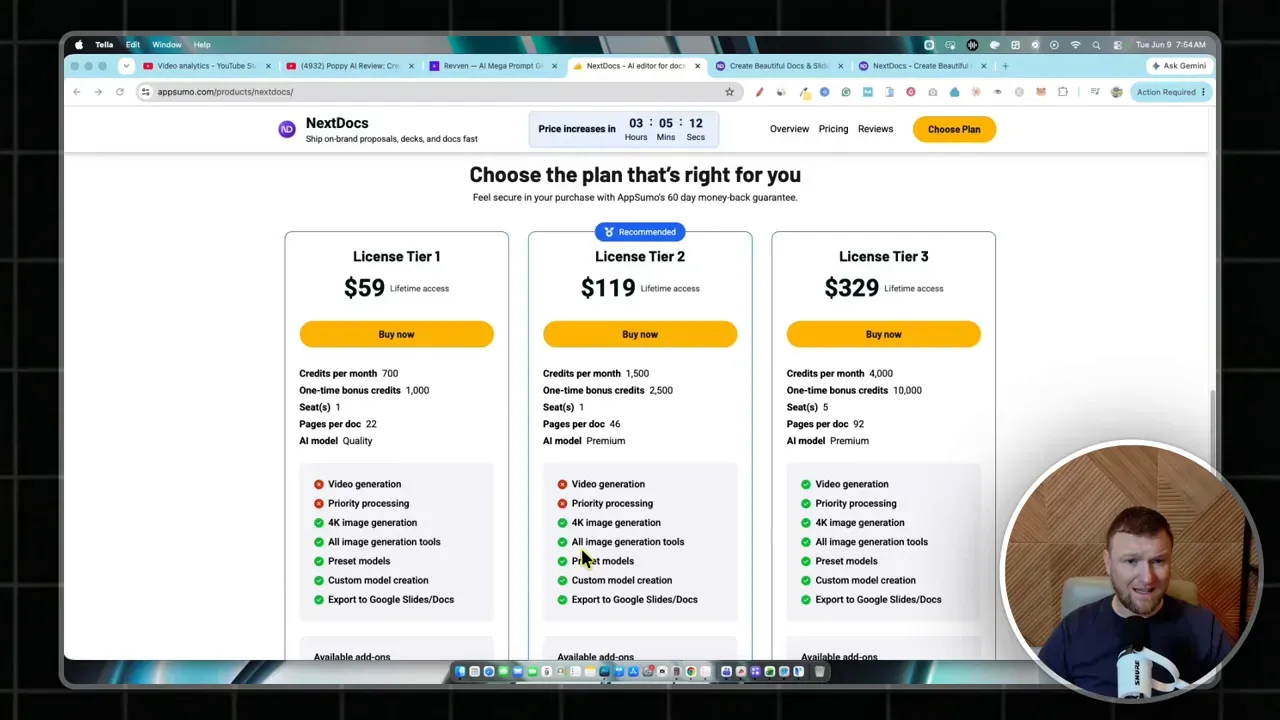
NextDocs uses a credit based setup. The pricing shown in the review broke down into three tiers:
- Tier 1 at $59 with 700 monthly credits and a one time bonus credit allocation
- Tier 2 at $119 with 1,500 monthly credits and 2,500 bonus credits
- Tier 3 at $329 with 4,000 monthly renewable credits, 10,000 bonus credits, and up to five seats
Tier 3 also included extras like priority processing, 4K image generation, and video generation related perks. There was also an option to buy additional credits later, with 1,000 credits priced fairly low.
One thing I found helpful was seeing actual usage instead of just marketing claims. During the hands on testing, the total spend came out to 287 credits for a pretty decent batch of outputs. That included a slide deck, a PDF style document, a few social assets, and another image based generation.
Based on that, Tier 1 feels a little tight unless usage will be very light. Tier 2 seems more realistic for a solo business owner. Tier 3 makes the most sense if this becomes part of a regular content workflow or if multiple people need access.
Brand kits and setup look promising
Before generating anything, NextDocs lets you set up a brand kit. That includes things like theme selection, colors, fonts, and logo assets. For anyone trying to keep PDFs, decks, and social content visually consistent, this is a big plus.
The editor also lets you switch themes and work in light mode or dark mode. That is not revolutionary, but it does help make the app feel a little more polished and customizable.
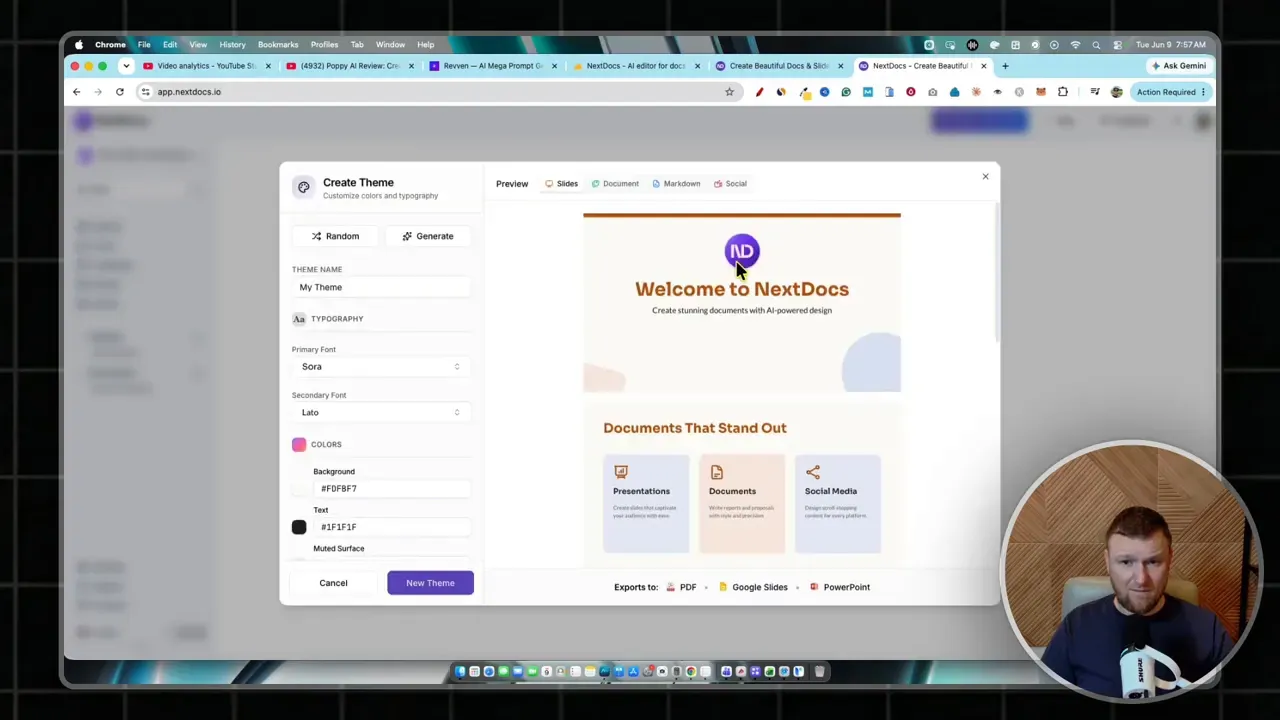
I liked that the branding system was not hidden away as some advanced feature. It felt like a core part of the workflow, which is exactly where it should be if the goal is turning rough ideas into business ready assets.
Building a slide deck from existing content
The most useful test was simple. A full software review script was pasted into NextDocs with instructions to turn it into a 12 page slide deck. The model setting was pushed to premium quality, and the tool started building.
That process took about four minutes, which is slower than a quick draft tool, but not unreasonable for higher quality generation. NextDocs also surfaced that it had found stock photos and illustrations to support the content.
What came back was a clean looking software review deck with a dark theme, organized sections, clear slide hierarchy, pricing slides, and a final verdict slide. More importantly, it did not just dump random generic fluff onto slides. It pulled relevant review points and structured them in a way that felt usable.
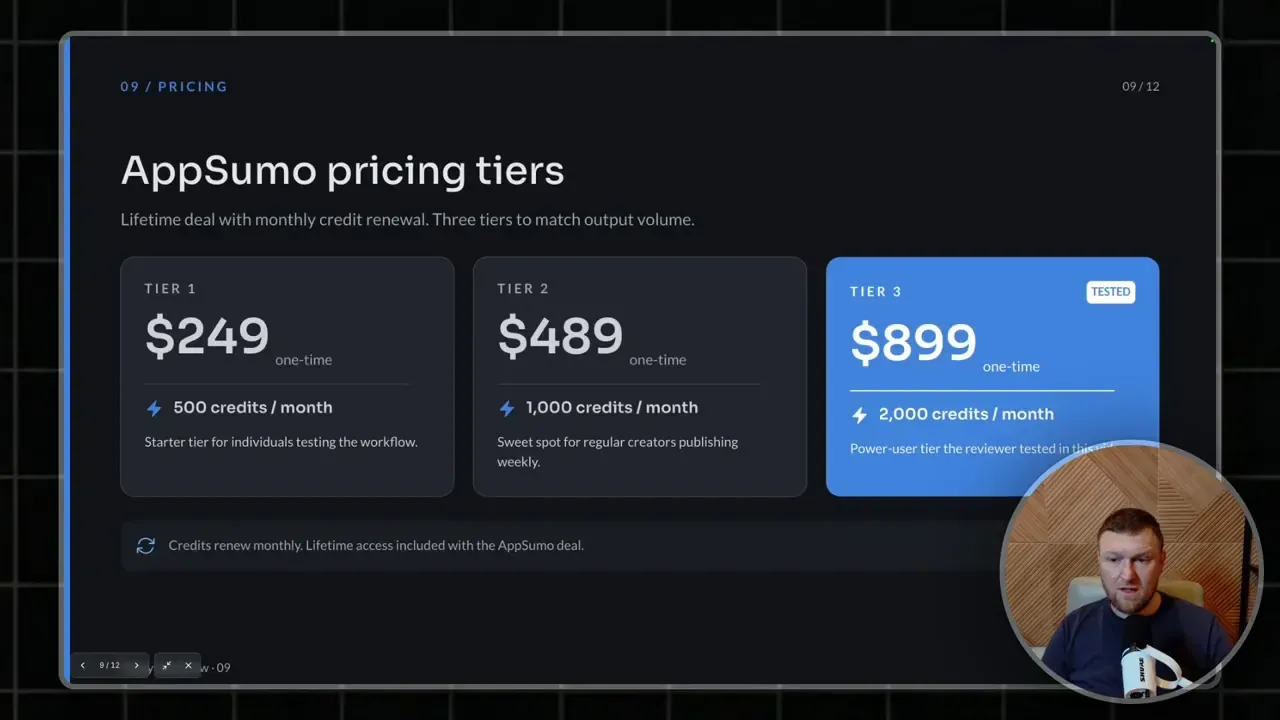
That is where NextDocs starts to look practical. If I needed to turn a review, training lesson, webinar notes, or research dump into a presentation fast, I could see this being genuinely useful.
It also supports an ask mode before creation, which acts more like a planning chat. That means you can refine the direction before spending credits on a final output. I like that idea because it gives the process a little more control instead of just hoping one prompt does everything right the first time.
How good were the slides?
The generated slides looked good overall. Not mind blowing. Not agency level custom design. But definitely clean enough to use for internal teaching, client walkthroughs, lead magnets, or faceless presentation videos.
Some strengths stood out:
- Good organization of ideas into sections
- Strong visual consistency
- Easy to skim headings and content blocks
- Useful business style layouts
- Professional looking output with minimal effort
There was also an option to present the slides directly inside the app, which makes it usable not just as a design tool but also as a simple presentation system.
One thing missing was more obvious control over transitions. That may not matter for static decks or PDFs, but if someone wants more polished motion inside exported presentations, this could feel limiting.
Adding a custom thumbnail to the first slide
A nice little test was uploading a custom image and asking NextDocs to place it on the cover slide. The tool handled that pretty well. It swapped in the uploaded thumbnail and integrated it into the first slide rather than breaking the whole design.
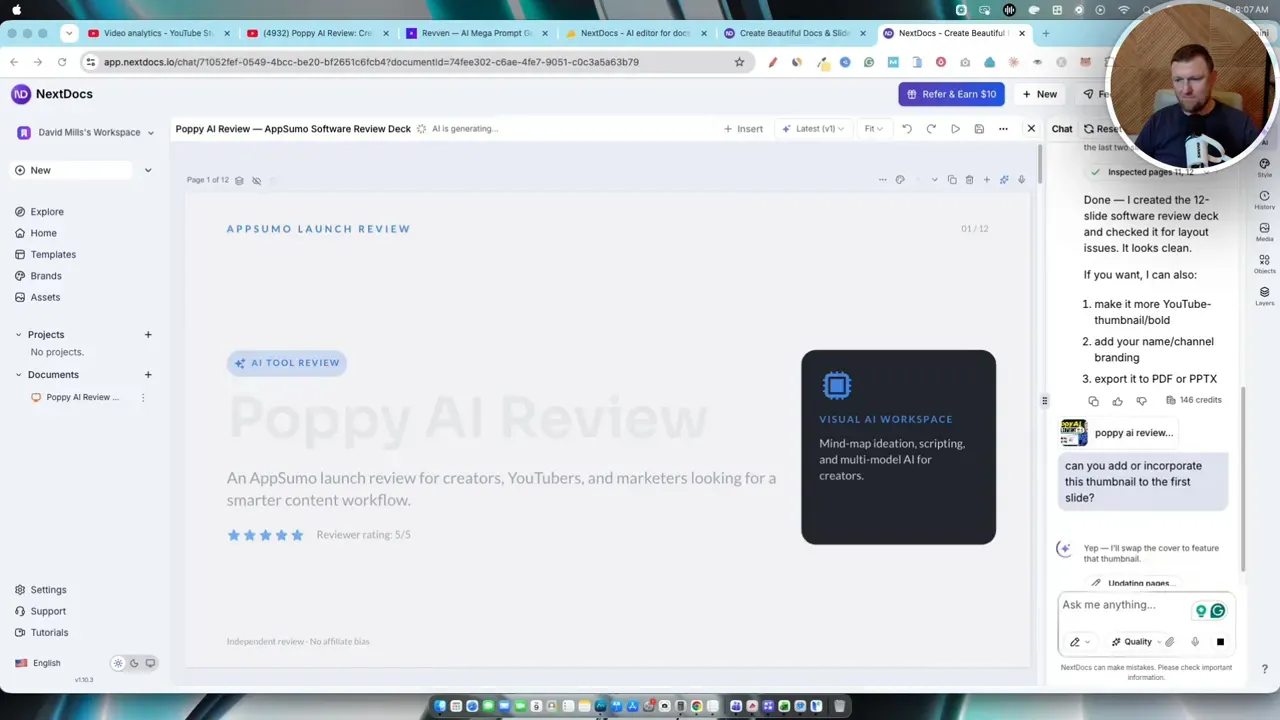
That might sound like a small thing, but it matters. A lot of AI design tools look good until you start trying to make them fit your actual brand assets. The moment you bring in a real thumbnail, logo, or product image, the layout can fall apart. Here, the result stayed usable.
There was an error message afterward saying the action needed another try, but the thumbnail had already been added. So the final result was fine, even if the interface felt a bit glitchy in that moment.
Export options are one of the strongest parts
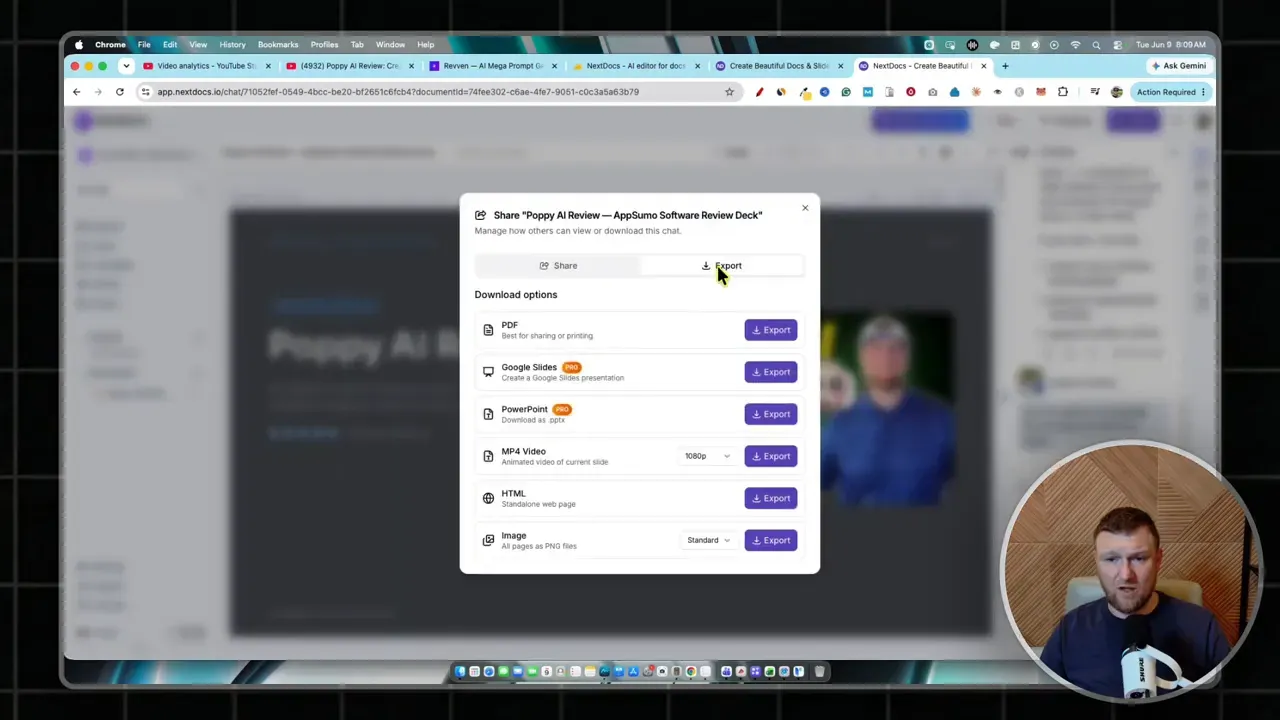
This is one area where NextDocs really impressed me. The export menu included:
- Google Slides
- PowerPoint
- Image
- HTML
- MP4 video
That gives the tool real flexibility. A lot of AI content apps create something attractive inside their own editor, then trap you there. NextDocs at least tries to make the outputs portable.
The PowerPoint export worked. The PDF export worked. And exporting to MP4 created a simple slide based video automatically.
The generated video was basic, but usable. It looked like each slide got around four to five seconds on screen, resulting in a short presentation video of roughly half a minute. I would have liked manual control over seconds per slide, because that would make this feature much more flexible for narration or background music timing.
Still, if someone wants to quickly create visual assets for content marketing, those export options make a real difference.
If this kind of workflow interests you, this review on video enhancing automation and this post about repurposing long form videos into social content are both relevant companions.
Document generation might be where it shines most
Slides were good, but the most interesting part might actually be the document creation.
A separate test used outside research on trending AI writing software. The prompt asked NextDocs to create a polished document using data, metrics, charts, and visuals. The output turned into a surprisingly attractive multi page document with sections like executive summary, shortlist, methodology, market landscape, and tool breakdowns.
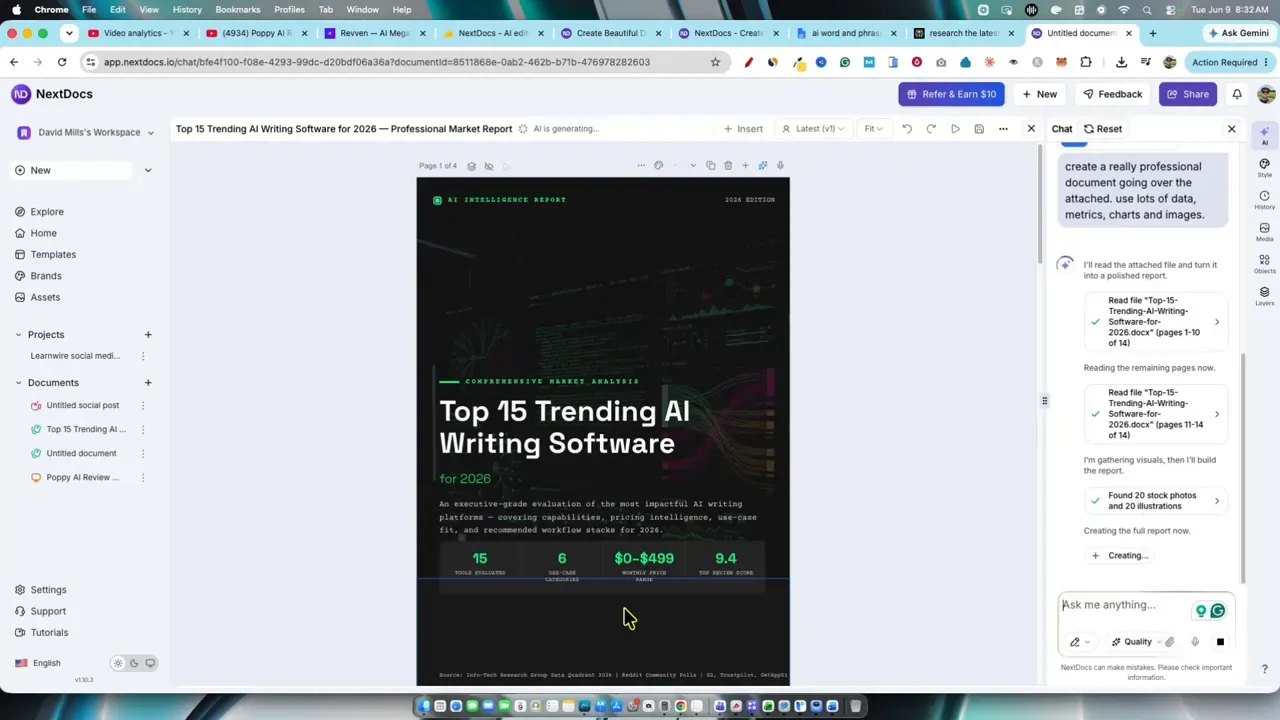
That is a strong use case.
I can easily imagine using this to create:
- Lead magnets
- Research reports
- Affiliate bonus PDFs
- Internal company docs
- Downloadable checklists and guides
The aesthetic quality looked strong enough that I would not feel embarrassed sharing the PDF as a downloadable asset. That is not something I can say about every AI document builder.
And if you are comparing AI writing or research tools for content workflows, you may also want to check out this roundup of AI text generation tools and this ranked list of AI copywriters.
Social media creation worked, but needed more tweaking
NextDocs also has a social content mode. The test here involved creating an Instagram style post and story based on source content. The tool generated multiple variants, which is great because social content is subjective and one draft rarely nails it.
It produced carousel and story style layouts, and the app let the better version be selected from multiple outputs.
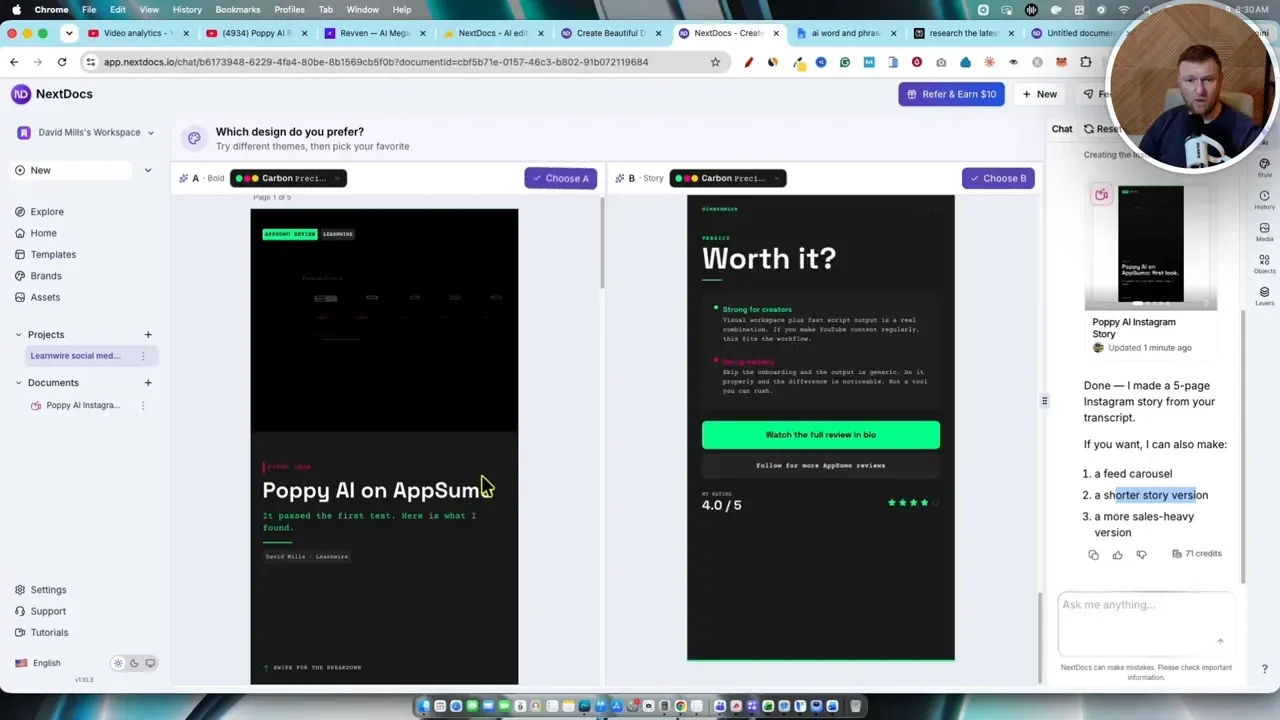
That said, the social outputs felt a little less polished than the slides and documents. One version came out too dark and hard to read. The design direction was there, but it seemed like it would need some manual adjustment before publishing.
I would describe the social feature like this:
- Good for ideation and fast drafts
- Less dependable than the document and slide builder
- Still useful if you are willing to edit
So yes, it works. But I would trust NextDocs faster with a PDF or deck than with final social creative straight out of the gate.
Projects and knowledge base support are a smart idea
Another feature that stood out was the ability to create projects with instructions, workflow rules, and uploaded knowledge assets. The idea is excellent. You create a branded project, define how content should be written, and give the system reusable context.
For example, a project could include:
- Your brand voice
- A company knowledge base
- Rules to avoid certain words
- Instructions for social media style
- Specific output formatting preferences
That is exactly the kind of feature that turns a generic AI app into a workflow tool.
Unfortunately, this is also where one of the bigger bugs showed up. File uploads for the project knowledge base stalled and did not complete properly, even with a very short document. The workaround was to paste the content into the instructions area manually instead.
So the concept is strong. The execution needs work.
The bugs and rough edges I would want fixed
NextDocs did enough right that I think it is a real tool, not some half built AI wrapper. But there were still a few issues that would matter in daily use.
The main complaints were:
- Project file upload delays or failures
- Occasional retry or error messages even when the action worked
- Some confusion around export permissions and account prompts
- Social outputs sometimes needing visual cleanup
- No obvious fine control for video timing per slide
None of those completely killed the experience, but they do keep the tool from feeling fully polished.
If you have used newer AI tools before, you probably know the vibe. It feels developed, useful, and promising, but still not quite at the level where every click feels perfectly reliable.
Templates add extra value
One feature that should not be overlooked is the template library. NextDocs includes prebuilt layouts for things like pitch decks and reports. That means you are not forced to start every project from a blank canvas or from a purely AI generated structure.
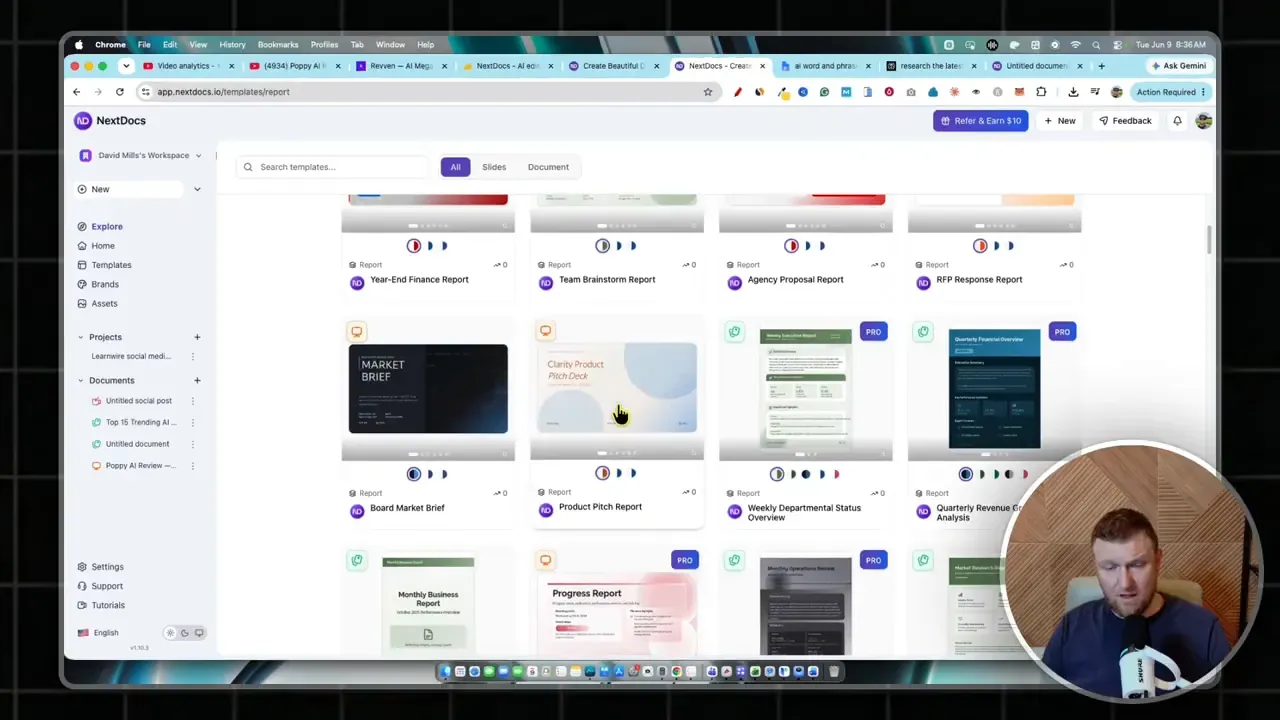
That is a real advantage for anyone who wants speed without randomness. Sometimes I do not want AI to invent the whole structure. I want it to fill in a solid framework that already looks good. Templates help with that.
How I would actually use NextDocs
If I were adding this into a real workflow, I would probably use it for four main things:
- Turning research into polished PDFs for lead magnets or paid downloads
- Converting long form content into slide decks for presentations and faceless videos
- Creating draft social assets that I could tweak before posting
- Packaging knowledge into branded visual documents much faster than building them manually
That use case lines up nicely with people building content businesses, affiliate sites, YouTube based funnels, or digital products. If that sounds like your world, the official NextDocs page is the natural place to look at the current deal.
And if you are trying to build out a fuller stack around AI tools instead of buying random software every week, AI Software Workflows is relevant too.
Final verdict
My takeaway is pretty simple. NextDocs is a solid AI content creation tool with clear strengths in slides and PDFs. It also has some smart workflow oriented features like brand kits, reusable projects, and multiple export formats.
Its biggest wins are:
- Strong slide generation
- Very promising PDF and document output
- Useful branding controls
- Wide export support
- Reasonable credit usage
Its biggest drawbacks are:
- A few bugs in file upload and project setup
- Social outputs not always as polished as the documents
- Some export and workflow friction
Overall, I would put it around 3.8 out of 5. That is a good score, not a hype score. It means the tool is useful today, and with a bit more refinement it could become even stronger.
If your main goal is creating attractive visual business assets fast, especially presentations, downloadable PDFs, and repurposed content, NextDocs looks like it can absolutely help.
For anyone also building with YouTube, tutorials, and content based monetization, this YouTube affiliate training resource may fit naturally with the same kind of workflow.
And if you want more software breakdowns in this lane, the broader LearnWire software reviews hub has plenty of similar tools worth comparing.