The Video Host That Killed My Vimeo Subscription: Livid Review

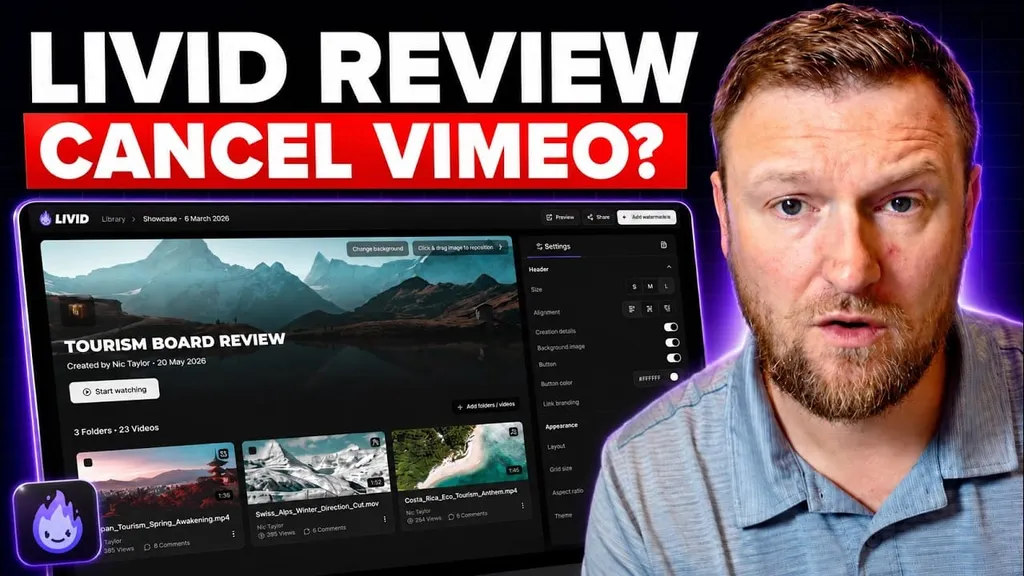
If you sell courses, run product launches, host training libraries, or just need clean video embeds on your site, video hosting gets expensive fast. That is usually where tools like Vimeo and Wistia come into the conversation. They work, sure, but the pricing and plan limits can start feeling pretty rough once your library grows.
Livid is trying to solve that problem with a simpler approach. It offers ad free branded video hosting, a customizable player, sharing controls, analytics, transcript generation, and a migration path from Vimeo. After going through how it works, I can see why it stands out as a strong Vimeo alternative, especially for business owners and course creators who care more about ease of use than a giant pile of advanced settings.
Table of Contents
- What Livid is actually built for
- Why Livid feels different from Vimeo and Wistia
- The pricing is one of the biggest reasons it gets attention
- The landing page gets one thing very right
- The dashboard is almost ridiculously simple
- Uploading videos is fast and easy
- Player customization is where Livid gets practical
- Transcript generation is built in
- Privacy and embed controls are solid
- Analytics are there if you need them
- You can apply appearance settings across a whole folder
- The Vimeo migration angle is one of Livid’s strongest selling points
- Who Livid makes the most sense for
- Where Livid stands out most
- A few things to keep in mind
- My final take on Livid
What Livid is actually built for
Livid is a video hosting platform focused on a few practical use cases:
- Hosting ad free videos under your own brand
- Embedding course videos on your website
- Replacing Vimeo for product, training, or sales content
- Controlling who can access or share your videos
- Keeping the video player clean and customizable
That last part matters more than people think. If I am embedding a course lesson, a VSL, or premium training on a site, I do not want distractions, third party branding, or weird recommended content. I want a controlled experience that looks professional.
Livid seems built exactly around that need. It is not trying to be a social video platform. It is trying to be a clean, business friendly host.
Why Livid feels different from Vimeo and Wistia
The biggest pitch here is simple: less cost, fewer headaches, and more control.
Wistia has long been known as a polished premium option, but it can get painfully expensive. Vimeo is cheaper at first, but many people eventually hit storage limits, bandwidth concerns, feature restrictions, or branding annoyances. If you upload lots of course videos over time, that becomes a real problem.
Livid positions itself right in that gap. It gives you a branded player, private and unlisted hosting, password protection, embeds, analytics, and migration support without the typical bloat.
Another thing that adds confidence is the founding team’s background in video and streaming technology. That matters because video hosting is one of those categories where a clunky product gets exposed immediately. Slow uploads, weird playback, broken embeds, and confusing controls ruin the whole experience. Livid does not come across like a first timer project.
The pricing is one of the biggest reasons it gets attention
The pricing shown was very straightforward, and honestly that is part of the appeal.
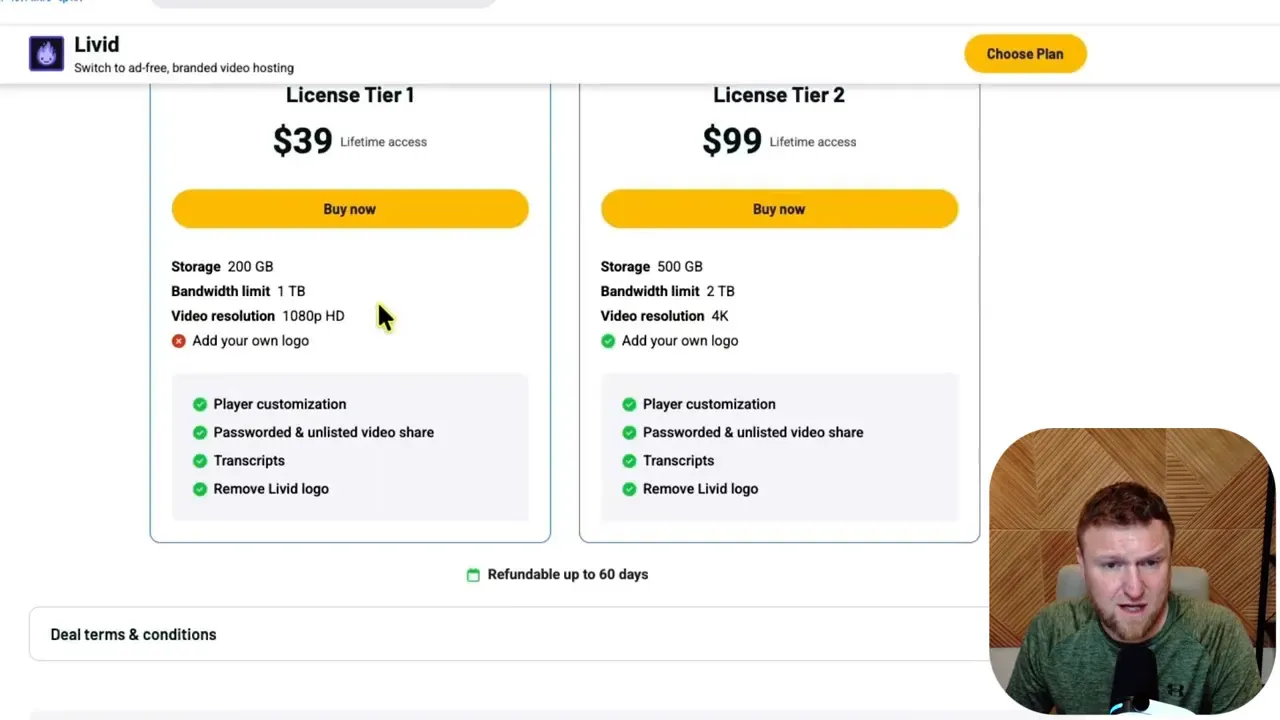
There were two main license tiers:
- Tier 1: $39 with 200 GB of storage, 1 TB bandwidth, and 1080p video
- Tier 2: $99 with 2 TB of storage, 4 TB bandwidth, 4K support, and branding removal
Storage is the total amount of video files you can keep inside the platform. Bandwidth is about delivery, meaning how much content can actually be streamed to people.
If I were hosting a handful of standard training videos, Tier 1 might be enough. But if I were running a larger course business, using lots of launch videos, or planning for growth, Tier 2 is the more obvious choice.
The jump to 4K and the ability to remove Livid branding make Tier 2 feel like the better long term play.
If you are comparing options, it helps to look at broader content and SEO workflow costs too. I have found that hosting is only one part of the stack. Tools that help with content production, optimization, and traffic can matter just as much. For example, if you are also trying to grow the content side of your business, this guide on advanced SEO strategies using AI tools is a useful complement.
The landing page gets one thing very right
This might sound minor, but I think it is worth mentioning. The Livid site is refreshingly clear.
Instead of burying the offer under endless sales copy, it gets to the point quickly. You can tell what the product does almost immediately. That kind of clarity is rare and honestly a good sign.
There is also a direct comparison with Vimeo, which makes the value proposition easy to understand. When a product can explain itself without making me scroll forever, I usually take that as a sign the team understands positioning.
The dashboard is almost ridiculously simple
Once inside, the first thing that stands out is how little clutter there is.
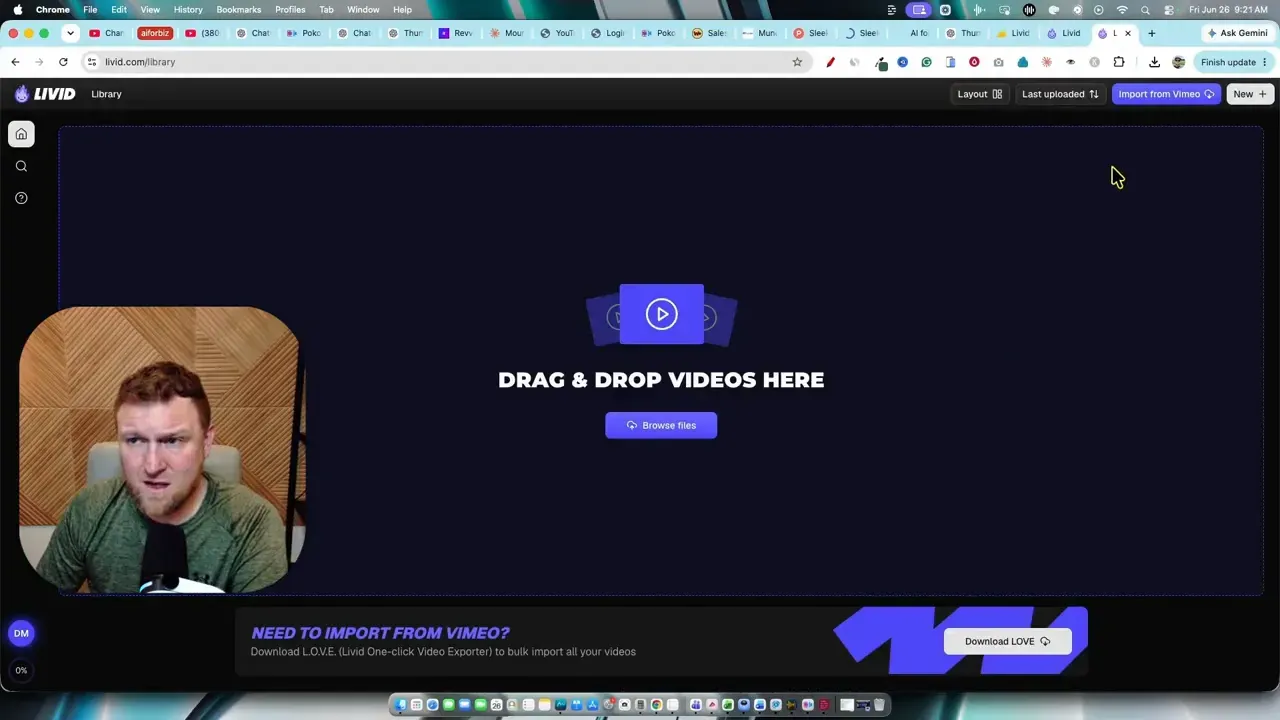
The dashboard is bare bones in a good way. You can:
- Search for videos
- Upload files
- Create folders
- Adjust layout view
- Access support
- Open settings and billing
That is pretty much it.
I know some people hear “simple” and think “limited,” but that is not what is happening here. It feels more like the product intentionally removes everything that does not need to be in your face.
If your main goal is to upload videos, organize them, customize playback, and embed them, this kind of interface is great. It lowers friction.
Uploading videos is fast and easy
The upload flow is exactly what I want from a hosting tool. Create a folder, open it, drag your files in, and let the system process them.
Batch upload worked much like Dropbox or Google Drive, except it felt purpose built for video libraries. Multiple videos were queued automatically, organized in the folder, and processed quickly.
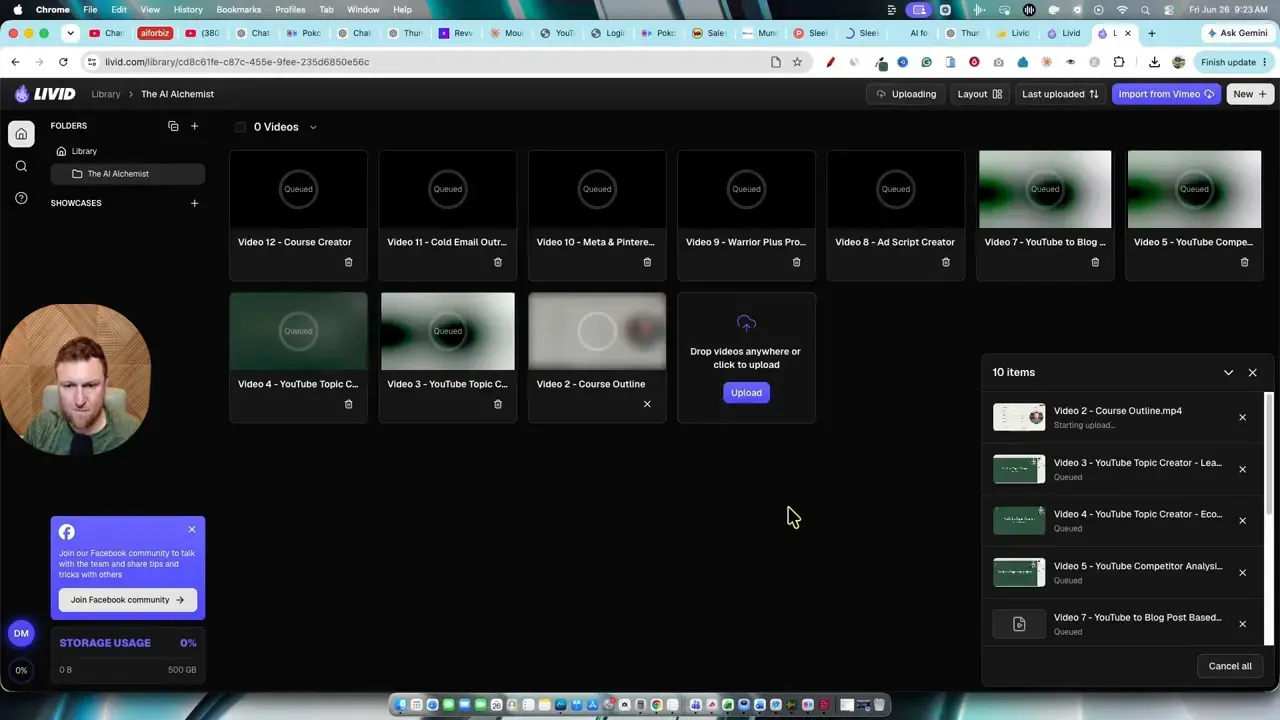
What stood out here was speed. Even longer videos moved through upload and processing faster than expected. Storage use also updates clearly, so you can keep an eye on how much of your plan you are consuming.
For course creators, this matters a lot. If I am uploading ten or twelve lessons at once, I do not want to babysit the process. I want to drop the files in and move on.
Player customization is where Livid gets practical
After a video is uploaded, Livid gives you a set of controls for how the player behaves and looks.
You can customize things like:
- Logo display
- Logo during playback
- Logo background
- Clickable logo link
- Playback speed options
- Video quality selector
- Thumbnail
- Description
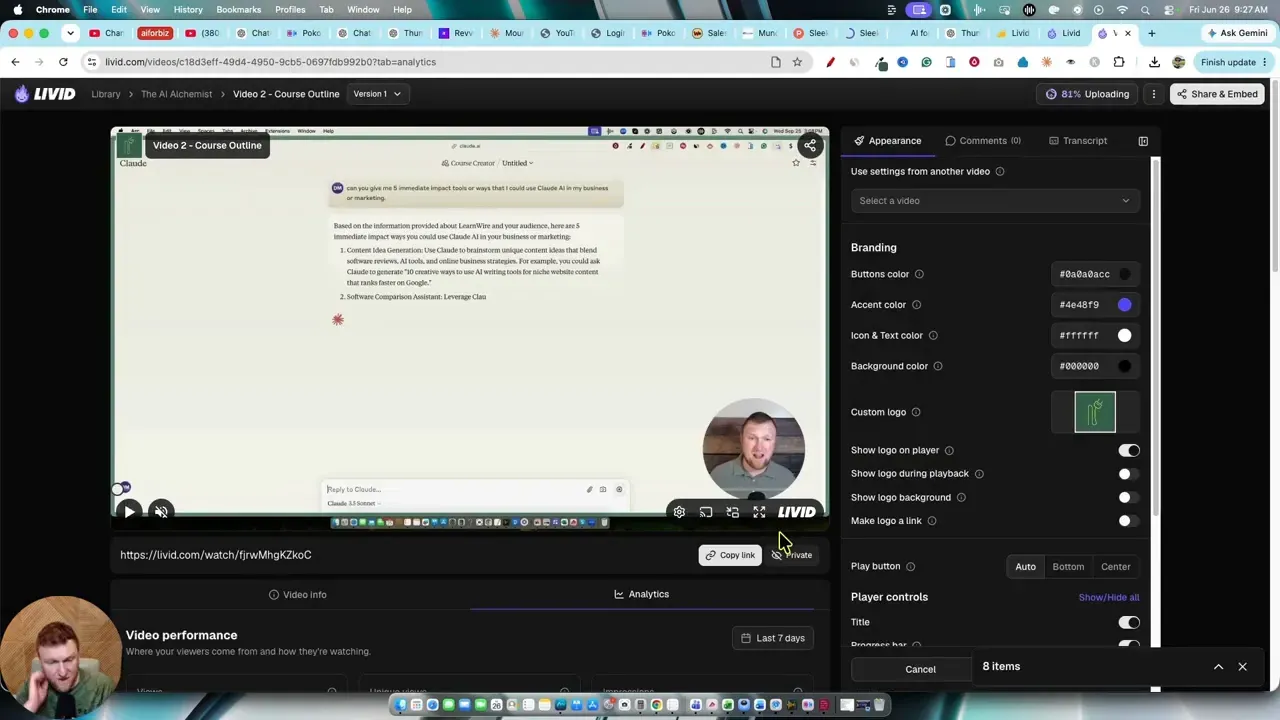
This is the part that makes Livid useful beyond basic hosting. It is not just a place to store files. It lets you shape the presentation.
For example, adding your logo in the player helps keep a polished branded experience. Making the logo clickable can push people back to your site. And if you are embedding content in a membership or course portal, being able to disable certain controls can be helpful.
One small but surprisingly important detail was the playback speed options. Livid includes 1.75x speed, which is a sweet spot that many platforms oddly skip. That might sound tiny, but for educational content it is genuinely useful.
Transcript generation is built in
One feature I did not expect to like as much as I did was the transcript tool.
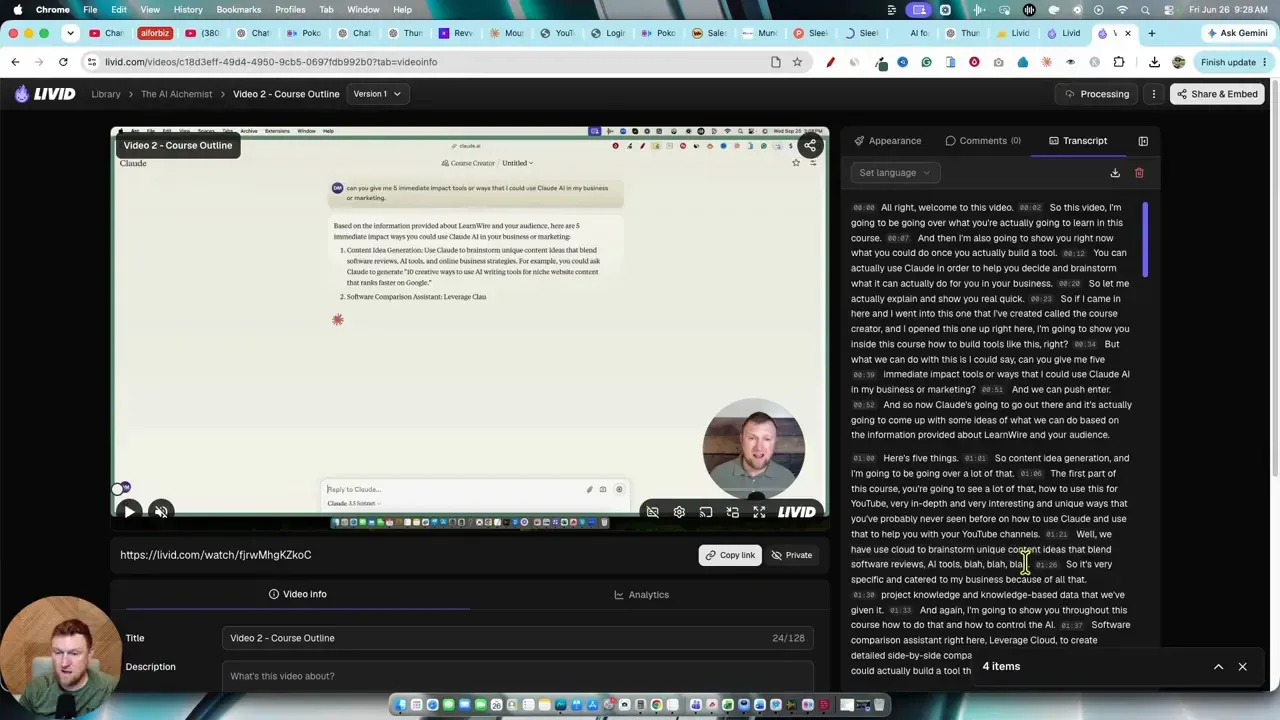
Once the video finishes encoding, Livid can generate a transcript right inside the platform. You can also download it afterward.
That opens up several practical uses:
- Creating captions or subtitles
- Repurposing course content into written material
- Saving time on note taking or content documentation
- Improving accessibility
If repurposing is part of your workflow, this can be a time saver. I have seen whole content systems built around turning videos into blog posts, clips, and email content. If that is something you care about, a related read worth checking out is this breakdown of AI tools that turn YouTube videos into blog content.
Privacy and embed controls are solid
Livid supports several sharing modes:
- Private
- Public
- Unlisted
- Password protected
This is exactly what I want for business hosting.
Private is useful when I only want the file stored without open access. Unlisted is ideal for embeds and hidden pages. Password protection adds one more layer when content should not be freely accessible.
Embeds are also handled cleanly. If a video is private, embedding is disabled. Change it to a shareable state like unlisted, and Livid provides responsive embed code you can place on your site.
That makes it a practical fit for:
- Online courses
- Membership areas
- Product demos
- Video sales letters
- Client training portals
Analytics are there if you need them
There is also a built in analytics section for each video. If you want to track video usage and engagement, that option is available.
I would not say analytics were the main headline here, but it is good to know the feature exists. For many business owners, being able to see how content is performing is enough. Not every tool needs to become an enterprise reporting suite.
You can apply appearance settings across a whole folder
This is one of the most useful workflow features in the platform.
After customizing one video the way you want, you can use that video as a template and apply its player appearance to the rest of the videos inside the folder.
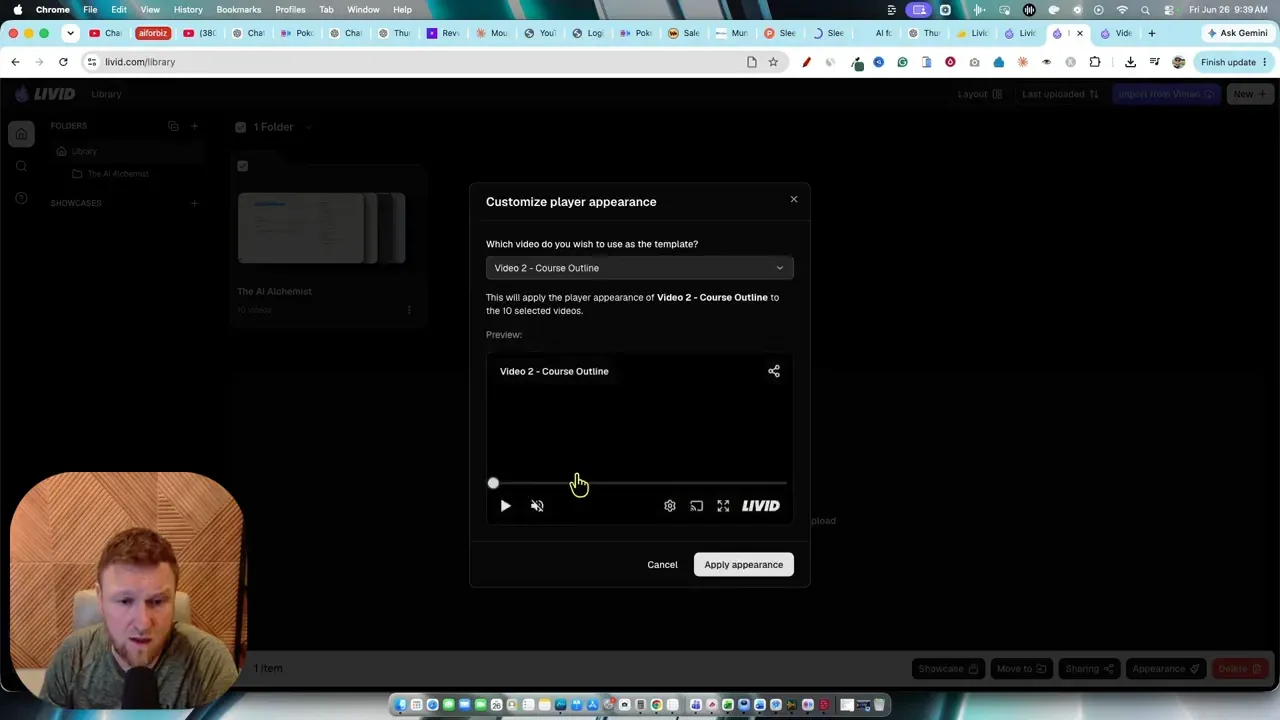
That means you do not have to manually repeat the same playback settings across ten or twenty lessons.
The process is basically:
- Customize one video first
- Save the settings
- Select the folder options
- Choose that video as the appearance template
- Apply it to the rest of the folder
That kind of bulk action is a bigger deal than it sounds. In a course library, consistency matters. I want the same controls, same player behavior, and same presentation on every lesson.
There was one important detail though. If you forget to save the customized source video first, your changes may not carry over. Once saved correctly, the appearance settings apply as expected, including the logo.
That workflow actually feels easier than Vimeo in this area, especially if you manage lots of lesson videos.
The Vimeo migration angle is one of Livid’s strongest selling points
If you are already invested in Vimeo, moving platforms can feel annoying. That is why Livid includes a migration tool called LOVE, short for Livid One Click Video Exporter.
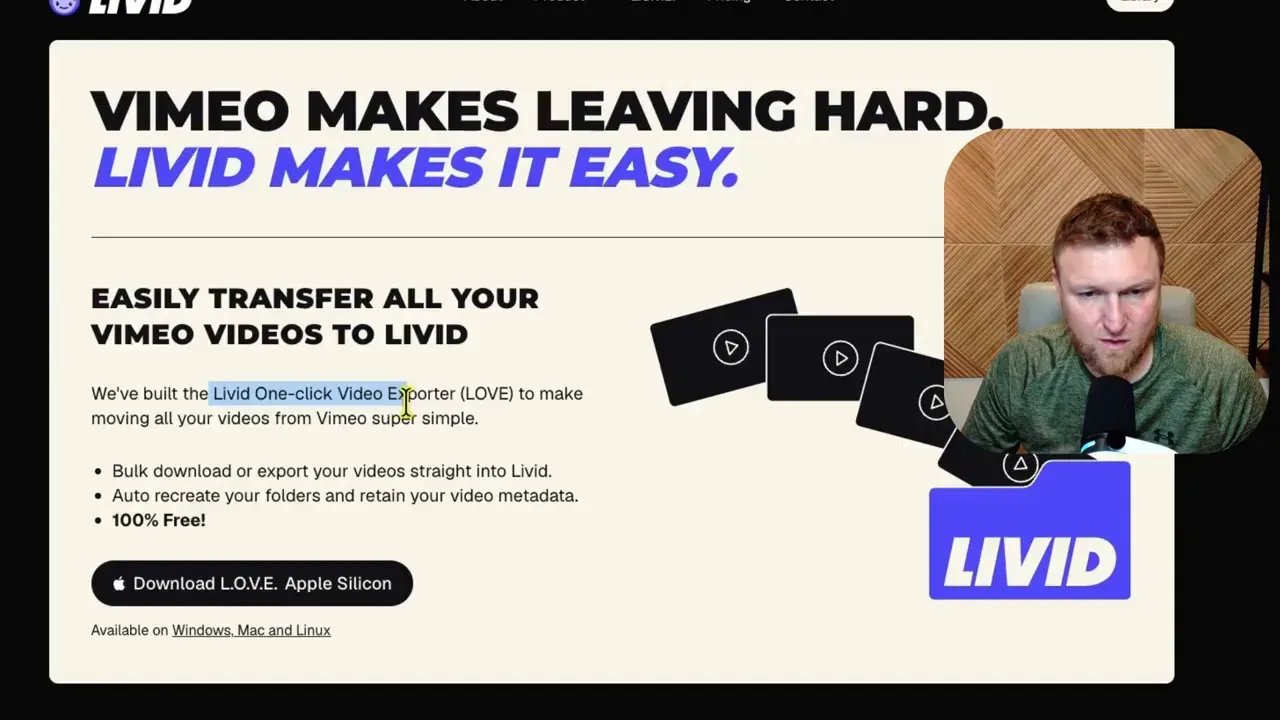
The idea is simple. You download the migration app for your system, connect the process, and transfer video files from Vimeo into Livid without manually reuploading everything one by one.
Supported download options shown included:
- Windows
- Apple Intel
- Apple Silicon
- Linux
This is smart because migration friction is one of the biggest reasons people stay with tools they no longer love. If Livid makes it easier to leave Vimeo, that removes a major barrier.
If you want to look at the product page directly, you can check out Livid here.
Who Livid makes the most sense for
I do not think this is for everyone, and that is fine. Livid seems best suited for people who need business focused hosting without platform bloat.
It makes the most sense for:
- Course creators who need clean lesson hosting
- Affiliate marketers using VSLs and sales videos
- Small businesses embedding training or demo videos
- Content creators who want ad free player control
- Anyone leaving Vimeo because of cost or limitations
If you are also building systems around AI and content workflows, there is a related resource at AI Software Workflows that lines up well with this kind of tool stack.
Where Livid stands out most
If I had to boil it down, these are the biggest wins:
- Simple interface that is easy to understand fast
- Clean branded player with useful customization
- Fast batch uploads for course libraries and training content
- Folder based organization that feels intuitive
- Built in transcripts for repurposing and accessibility
- Strong privacy controls for premium content
- Vimeo migration support for easier switching
- Reasonable pricing compared with well known alternatives
A few things to keep in mind
No tool is perfect, and a few practical notes are worth remembering.
- You need the right privacy setting if you want embed code to work
- Bulk appearance changes work best after saving the source video first
- Some features, like player branding removal and 4K, are tied to the higher tier
- The platform is intentionally minimal, which is great for many people but may feel too lean for those wanting a huge feature set
Personally, I see the minimalism as a strength. Most of the time I would rather use a focused tool that nails the basics than a bloated one that buries simple tasks under layers of menus.
My final take on Livid
Livid looks like one of those tools that solves a very specific pain point and does it well. It is not trying to reinvent online video. It is simply giving businesses and creators a cleaner way to host, brand, manage, and share videos without dealing with the rising cost and friction of Vimeo or Wistia.
What I like most is that the product seems grounded in real use. Uploading a course, customizing a player, generating transcripts, embedding content, and copying settings across a folder are all practical actions, not flashy gimmicks.
If I were hosting course videos, premium training, or sales content on my own site, Livid would absolutely be on my shortlist. And if I were already feeling boxed in by Vimeo pricing or plan limits, I would take a very serious look at it.
For more software reviews in this space, the main LearnWire software reviews hub is worth browsing. If video repurposing is also part of your strategy, this review of Chopcast is another relevant read.
Bottom line: Livid feels like a real world upgrade for anyone who wants ad free branded video hosting without the usual mess.