Grapes Studio Review: Build Websites in Minutes with an $8/month AI Tool

I spent a few hours putting a new AI website builder through its paces and came away impressed. Grapes Studio promises full, responsive landing pages created from a single prompt, hosting included, and an annual plan that’s under $100. That pricing alone turns heads. But does it actually replace WordPress for most projects? Can it compete with agency builds? I tested the UI, the AI prompt flow, theme cloning, the blog features, domain setup and publishing. Here’s what I learned and how I’d use Grapes Studio in 2026.
Table of Contents
- What Grapes Studio actually is (and who it’s for)
- How the prompt-based workflow feels
- What the editor is like: drag and drop with AI controls
- Blog support and dynamic content
- Publishing, domains, and hosting
- Pricing and the AI credit model
- Code access and migration options
- Agency workflow and template duplication
- Speed, quality and the “is it better than WordPress?” question
- Pros and cons (straightforward list)
- Where Grapes Studio makes the most sense
- How I’d incorporate Grapes Studio into my toolkit
- Helpful guides and resources I recommend
- Final verdict and rating
- Quick checklist: Should you try Grapes Studio?
- Where to start
What Grapes Studio actually is (and who it’s for)
At its core, Grapes Studio is an AI-first website builder focused purely on websites. You give it a prompt, optionally attach a style reference or screenshots, and it generates a complete landing page with sections, forms, and responsive layouts. Hosting is included, code access is provided, and the pricing model is heavily credit-driven but starts very affordably.
It’s aimed at:
- Small business owners who want a fast, affordable site.
- Freelancers and solopreneurs who need quick landing pages.
- Agencies that want a repeatable template workflow and fast delivery for low-to-mid budget clients.
How the prompt-based workflow feels
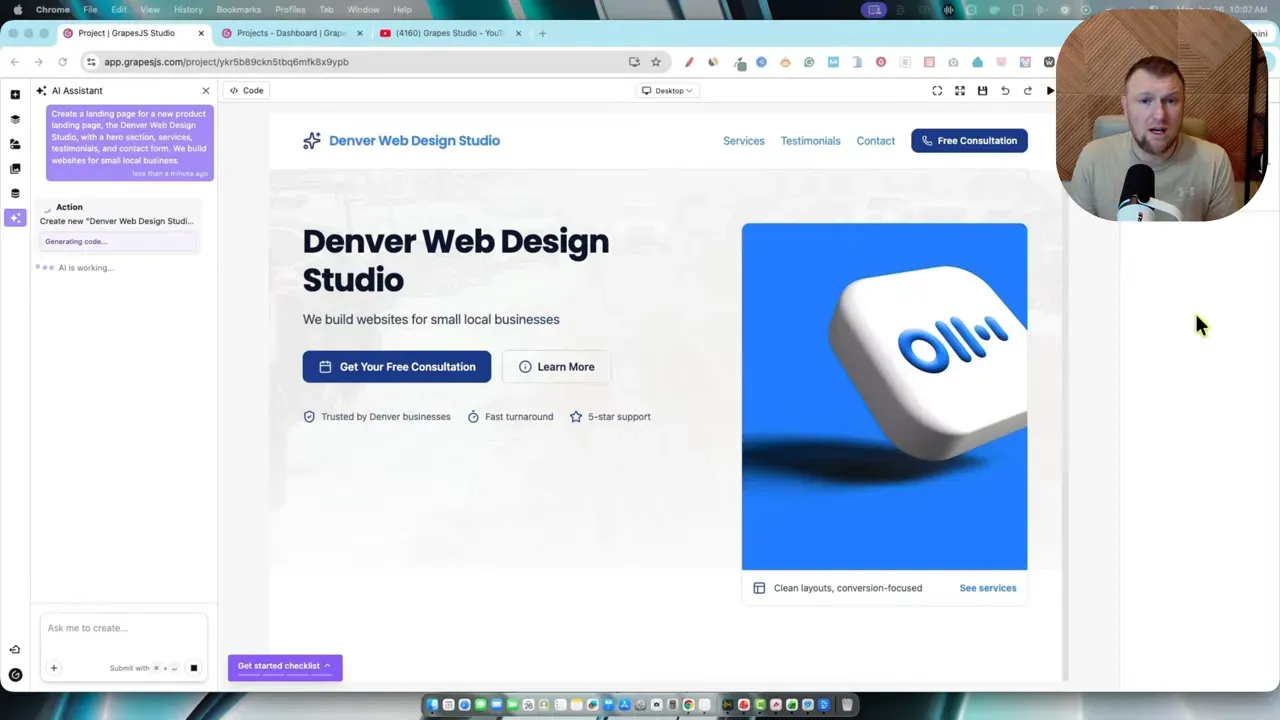
The experience starts by typing (or speaking) a short design brief. I used something simple: a Denver Web Design Studio with hero, services, testimonials, and a contact form focused on small local businesses. Within moments the AI began rendering the page live inside the editor—the hero block appeared, images loaded, and text populated.
Two things stood out here. First, the AI shows the design construction in real time, like watching an LLM type. That live feedback speeds iteration because you don't wait minutes only to see a result. Second, the prompt interface accepts screenshots and style references so the AI can mimic a look you like.
Style matching and screenshots
I grabbed a Webflow template screenshot and uploaded it as a style reference. The AI analyzed the image—rounded buttons, bold headings, minimal nav—and applied similar fonts, color accents, and spacing across the site. It didn't always nail every detail, but it got the overall vibe quite well.
What the editor is like: drag and drop with AI controls
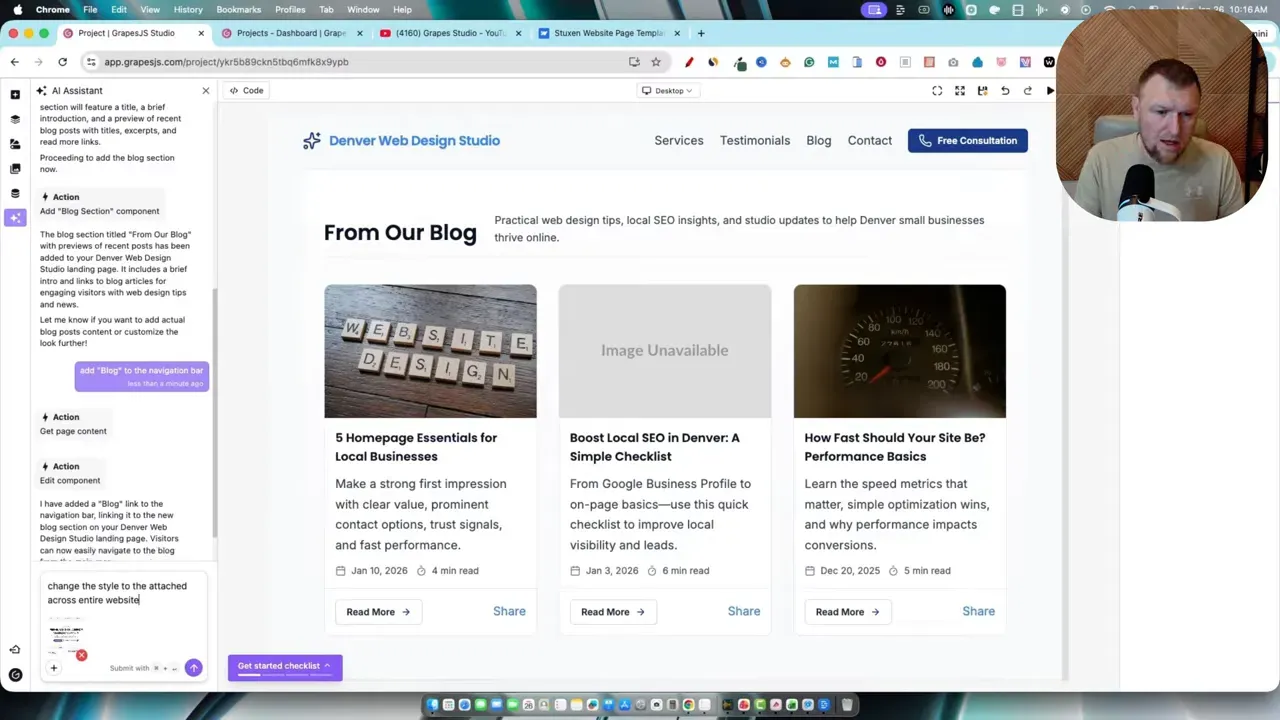
Once the assembly was done, the generated site lived inside a visual editor. You can:
- Drag, resize and replace images directly.
- Edit text inline.
- Set button actions (link to a page, anchor, or external URL).
- Switch global styles like primary color and typography.
The left sidebar exposes pages, layers, collections, and useful components like forms, navbars, and input fields. It’s familiar enough for designers, and approachable for non-designers who don’t want to touch code.
Blog support and dynamic content
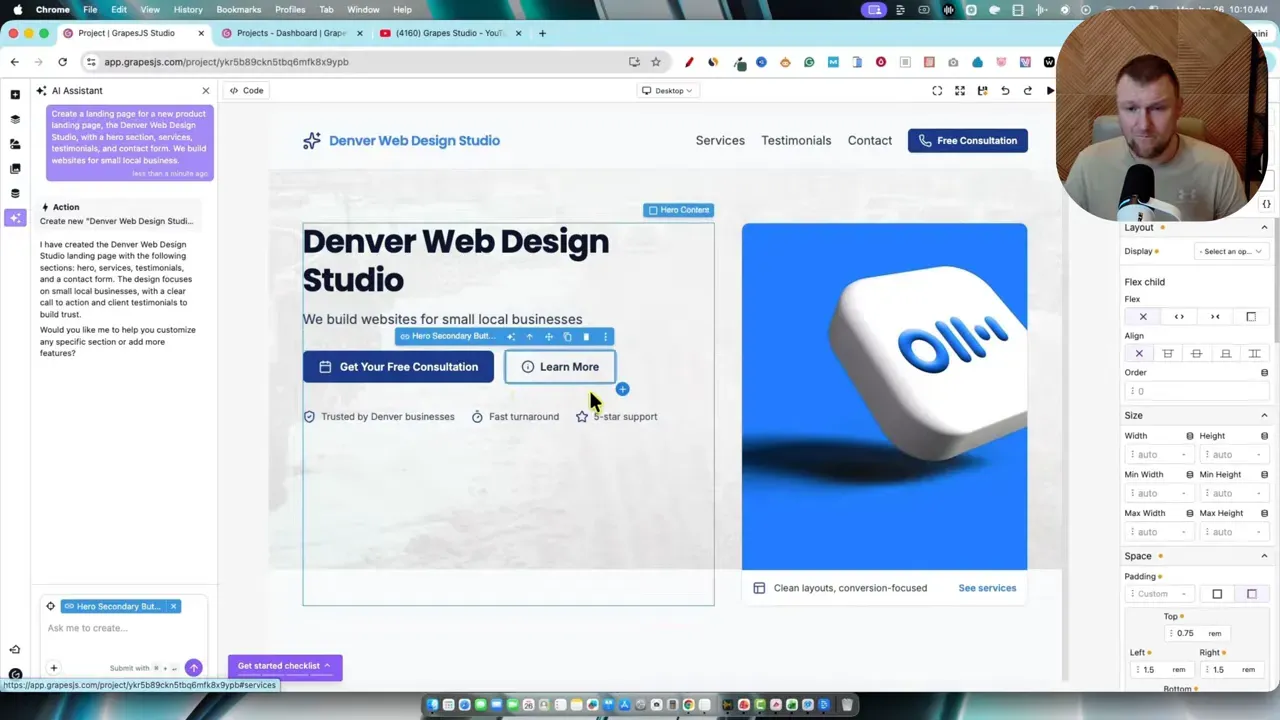
One pain point with many AI site builders is adding a proper blog. Grapes Studio handles this with a conversational add command. I typed “add a blog section” and it dropped a blog preview block with post cards and images. Then I said “add blog to the navigation” and the nav updated live.
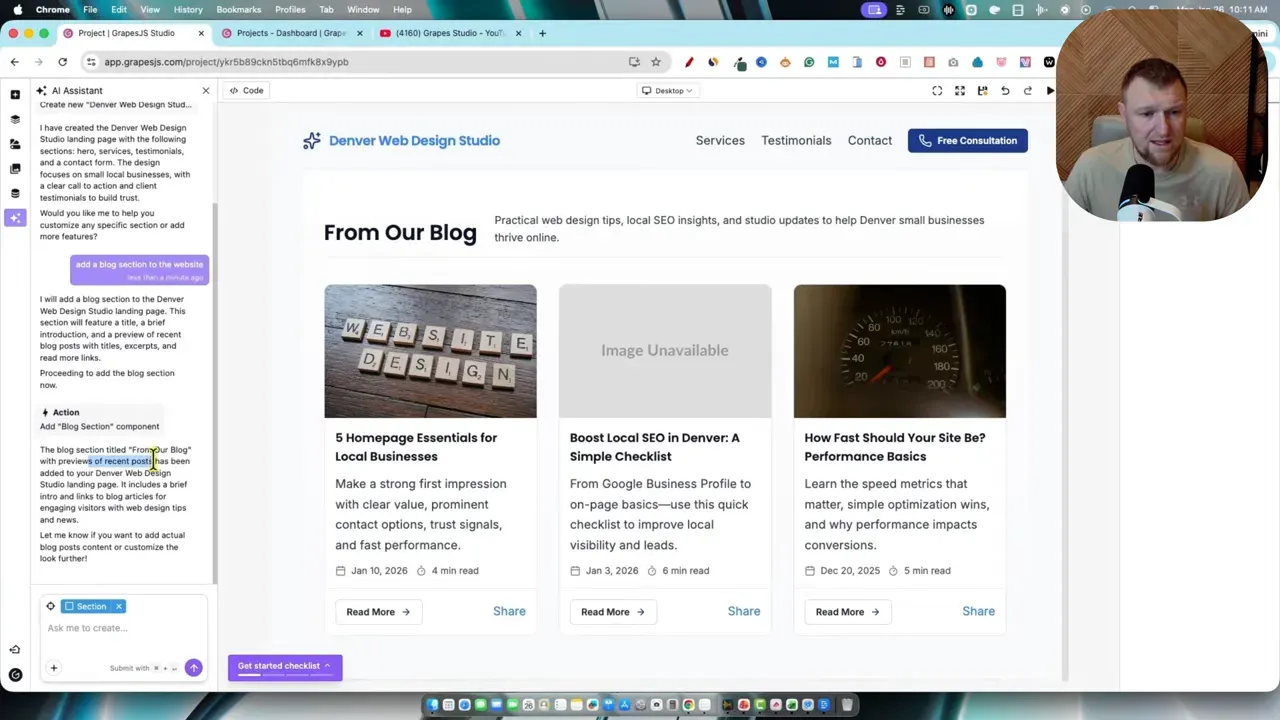
Under the hood, blogs become collections and you can create tables or databases for dynamic content. It’s not as plug-and-play as WordPress out of the box, and there’s a learning curve to setting up post creation, slugs, and templates. But there are tutorial videos from Grapes Studio and once you learn the flow, it’s powerful.
Publishing, domains, and hosting
Publishing is simple. You click publish, name the project, and the platform either hosts it on a generated domain or lets you connect a custom domain by setting an A record. After configuring DNS, the site generally shows up in a few hours; DNS propagation varies, but the workflow is straightforward.
Hosting is lightning fast and likely built on AWS infrastructure. You get storage and delivery included with the plan, which removes the headache of separate hosting bills and server maintenance.
Pricing and the AI credit model
This is the part that made me sit up. Grapes Studio’s annual plan is roughly $99 a year, which breaks down to about $8.33 per month. The monthly starter is around $10. Both are extremely competitive compared to typical managed WordPress hosting plus a premium theme and page builder.
Their approach is to keep you on a low base plan and sell extra AI credits as one-offs. So if you only need a few AI builds in a month, you avoid being locked into a high recurring tier. That flexibility is great for small shops or occasional users.
Code access and migration options
One major win: you can export or access the site code. That means you’re not trapped. If you love the design and want to self-host or migrate later, the code is available. This opens up two workflows I find useful:
- Build fast on Grapes Studio, then export and host on your own infrastructure if you need full control.
- Keep everything on Grapes Studio for a simple managed workflow—great for retainers and maintenance packages.
Agency workflow and template duplication
For agencies, the duplication workflow is gold. Create one high-quality template for a niche, duplicate the project, swap logos, tweak colors and copy, and hand over a site within an afternoon. Combine this with the AI prompt to update the copy and images and you can deliver a fast turnaround at scale.
Workspaces and project organization let you keep client work separate and tidy. If you plan to run retainers, it’s a nice platform to learn deeply.
Speed, quality and the “is it better than WordPress?” question
Quick answer: for many use cases, yes. Grapes Studio produces modern, clean, and responsive landing pages that look premium. The speed of delivery and quality of templates put it a notch above many low-cost lifetime deal tools.
But WordPress still wins for large blogs, complex plugins, heavy editorial workflows, and when you need a large plugin ecosystem. If your primary goal is a content-first site with dozens of published posts, WordPress might remain the better choice—unless you want to tackle Grapes Studio’s blog collections and learn its dynamic content system.
Pros and cons (straightforward list)
Pros
- Speed: Full landing pages in minutes.
- Price: Hosting included at $8–$10 a month or $99/year.
- Exportable code: You can migrate off-platform.
- Live AI rendering: Watch the page build in real time.
- Niche-friendly: Duplicate templates and scale quickly for clients.
Cons
- Blog/networking complexity: Blog setup has a learning curve compared to WordPress.
- Storage limits: 10GB cloud storage might become limiting for image-heavy clients (they likely offer upgrades).
- Not a full ecosystem: Grapes Studio focuses on websites only; it doesn’t try to be an all-in-one app builder.
Where Grapes Studio makes the most sense
Use Grapes Studio when:
- You need a fast, high-quality landing page for a local business.
- You want a cost-effective solution for hosting and maintenance.
- You’re an agency or freelancer shipping many similar sites.
- You want to prototype and iterate quickly with real design output from an AI prompt.
Don’t use it if:
- Your project needs dozens of custom plugins and complex back-end integrations that WordPress or a bespoke build already supports.
- You run a large publishing site and don’t want to learn a new CMS workflow.
How I’d incorporate Grapes Studio into my toolkit
I’d use Grapes Studio as a first-stage build tool. Create the landing page or site, validate with the client, then either:
- Keep it hosted on Grapes Studio and charge a monthly retainer for updates and hosting.
- Export the code and migrate to a self-hosted environment if the client grows and needs a more bespoke stack.
If you’re comparing hosting costs, check out my deeper hosting review for alternatives and price comparisons at:
https://learnwirepro.com/siteground-review-professional-website-hosting-easy-quality-great-pricing/
Helpful guides and resources I recommend
If you like the idea of AI-assisted website building, you’ll probably want to round out your toolkit with other tools and learning resources. These posts dive into hosting comparisons, alternative builders, and AI workflows I use personally:
- Hosting & pricing: https://learnwirepro.com/siteground-review-professional-website-hosting-easy-quality-great-pricing/
- Deep-dive into AI website builders like Pineapple Builder: https://learnwirepro.com/pineapple-builder-review/
- Best AI tools for website optimization and content: https://learnwirepro.com/10-best-ai-software-tools-for-website-optimization/
- Workflows for turning video into blog content (useful if the client has video assets): https://learnwirepro.com/video-enhancing-automation-review/
- Advanced SEO strategies using AI: https://learnwirepro.com/advanced-seo-strategies-using-ai-tools/
Final verdict and rating
Grapes Studio is a genuine step forward in the AI website builder space. It balances ease, quality, and price in a way that will make a lot of people rethink starting projects with WordPress for basic to medium complexity sites. The annual price of $99 with hosting included is a disruptive offer.
My personal rating: 4.7 out of 5. I docked a few points for the blog setup learning curve and the potential storage limits, but the speed, exportable code, and agency-friendly duplication workflow make this a tool I’d seriously consider for client work.
Quick checklist: Should you try Grapes Studio?
- If you want a fast MVP or landing page: yes.
- If you run an agency and need repeatable delivery: yes.
- If you need a content-heavy publishing platform: maybe—consider the learning curve or export to WordPress later.
- If you want full control over server architecture and plugins today: maybe stick with WordPress or export after prototyping.
Where to start
Try the free tier to see the AI prompt flow and how templates work. If it clicks, the annual plan is an extremely compelling value. For more context on how this stacks up to WordPress hosting costs, check this hosting review:
https://learnwirepro.com/siteground-review-professional-website-hosting-easy-quality-great-pricing/
If you want to explore more AI software that pairs nicely with site creation—SEO tools, copywriters, content workflows—start here:
- AI software workflows overview: https://my.learnwirelinks.com/aisoftwareworkflows
- AI writing & SEO tools roundup: https://learnwirepro.com/30-best-ai-copywriters-ranked-tier-list-2023/
- Content automation case study: https://learnwirepro.com/contentpace-case-study-results-proof-it-works-12-hour-page-1-ranking/
Grapes Studio isn’t perfect, but for speed, price and simplicity it’s one of the most practical AI tools I’ve tested for building client sites. If your business needs fast turnarounds or low-cost hosting with solid output, give it a spin and see if it fits your workflow.