Best AI Productivity Tools for Managing Multiple Businesses
Discover the best AI productivity tools for solo entrepreneurs managing multiple businesses, from automation and planning to meetings and content.


Running several businesses does not mean you need several disconnected software stacks. The best AI productivity tools for solo entrepreneurs managing multiple businesses help you run shared work once, keep sensitive business details separated, and prevent small admin tasks from swallowing the week.

The right answer is rarely “buy more AI.” It is usually a lean system: one place to capture work, one general AI assistant, one automation layer, and a few specialized tools only where they remove a repeatable bottleneck. The goal is not to make every process automatic. It is to make sure every message, decision, task, and follow-up lands in the right business.
Table Of Contents
Article Sections
• Build A Lean Multi-Business AI Stack
• Create Workflows That Do Not Drop Tasks
How To Use This Guide
Start with the workflow that repeats across all your ventures. For many solo operators, that is inbox triage, task capture, content drafting, client meetings, or follow-up. Choose tools based on those shared jobs, not based on whether a tool looks impressive in a demo.
Key Takeaways
The Best Stack Is Usually Smaller Than Expected
I recommend starting with one general AI assistant, one operations hub, and one automation platform. Add a specialized tool only when it solves a clear, recurring problem that the core stack cannot handle well.
A useful starter setup often includes:
• A general assistant such as ChatGPT or Claude for planning, drafting, analysis, and idea development
• An operations hub such as Notion AI for notes, tasks, standard operating procedures, and decisions
• Zapier for moving data between tools and triggering routine actions
• A meeting assistant such as Fathom when calls regularly create tasks, proposals, or client commitments
• A calendar protection tool such as Reclaim.ai when competing priorities keep pushing deep work aside
Separate Business Contexts, Not Every Tool
You do not need a completely separate subscription for every brand. You do need clear boundaries inside shared tools. Use separate workspaces, databases, folders, tags, automation paths, and templates for each entity.
For example, one Notion workspace can work well if every record includes a required Business field. A task without a business owner should be treated as incomplete, much like an invoice without a customer name.
Spend Against A Specific Workflow
A subscription earns its place when it saves meaningful time or prevents costly mistakes in a named workflow. A $20 tool that eliminates five manual follow-up steps every week can be a better buy than a $50 tool used only for occasional brainstorming.
GetStackSmart’s 2026 budget guidance for solo operators places lean stacks around $20 to $80 per month, while more advanced setups with automation, meeting notes, and coding support can reach roughly $100 to $200 monthly. The implication is simple: software costs rise faster than usefulness when tools overlap.
Build A Lean Multi-Business AI Stack
Choose Tools By Shared Workflow, Not Business Name
The most practical way to choose AI software is to map the work you do across every business. A consulting business, online store, newsletter, and course brand may look unrelated from the outside. Behind the scenes, they often share the same operational jobs:
| Shared Workflow | Best Tool Category | What Should Stay Business-Specific |
|---|---|---|
| Planning and drafting | General AI assistant | Brand voice, offers, client facts, confidential documents |
| Tasks, notes, and SOPs | Operations hub | Project ownership, business tags, access permissions |
| Lead follow-up | Automation platform or sales tool | Contact lists, pipeline stages, sender identity |
| Meetings and decisions | Meeting transcription tool | Client account, legal notes, assigned follow-up owner |
| Content production | AI design and editing tools | Logo files, style guides, publishing calendars |
| Calendar management | Scheduling and focus tools | Availability rules, meeting links, business calendar |
This approach reduces context switching because the method stays consistent even when the business changes. Instead of remembering four task systems, you use one intake process with four clearly labeled destinations.
For broader category comparisons, the best AI tools guide can help narrow down options beyond productivity software. Just avoid treating every useful AI app as a necessary subscription.
Pick A General Assistant: ChatGPT Or Claude
ChatGPT and Claude are both strong starting points for solo operators. The better choice depends less on public feature lists and more on where your work becomes slow or messy.
| If You Need More Of This | Consider | Why It Fits |
|---|---|---|
| Brainstorming, planning, quick drafts, broad task support | ChatGPT | Useful as a flexible day-to-day assistant across many work types |
| Longer writing, careful revisions, nuanced document work | Claude | Often preferred for extended writing and detailed reasoning tasks |
| Research with visible source discovery | Perplexity | Keeps research separate from drafting and can speed up initial fact gathering |
There is no reliable universal winner. A Reddit participant in a solo-business-owner discussion described using ChatGPT for brainstorming and planning while using Claude for writing and more nuanced thinking. That real user split between planning and writing is a sensible model when one assistant consistently produces better results for one type of work.
Fair warning: using two general assistants can create duplication. If both are open every day but neither has a defined role, you are paying for choice rather than productivity. Start with one. Add the second only when a recurring task exposes a real gap.
Use An Operations Hub As The Source Of Truth
Notion AI is a strong fit for solo entrepreneurs who need tasks, notes, documentation, and content plans in one place. Its value is not that it writes every document for you. Its value is that it can put business context beside the work.
Create one master workspace with separate databases or controlled areas for each business. At a minimum, each task, meeting note, content asset, and decision should include:
• Business or legal entity
• Project or client
• Work type, such as sales, operations, content, finance, or delivery
• Status and due date
• Source link, message, or meeting record
• Next action and owner, even if the owner is always you
UseCarly’s essential-stack overview frames the workspace, automation, and AI executive-assistant categories as core parts of a solo setup. That framing is useful because one app should not be forced to do every job. Your workspace is for operational memory; your assistant is for thinking and producing; automation is for moving work.
Add Narrow Tools Only When The Work Repeats
Specialized AI tools become worthwhile when the same friction appears every week. A meeting recorder makes sense after several calls create manual notes. Canva makes sense when every business needs regular visuals. Descript becomes more compelling if audio or video editing is a meaningful part of customer acquisition.
AI Tools Capital’s staged stack approach recommends expanding tools as the business grows rather than buying everything at once. That is the safer sequence. First solve thinking and execution. Then solve recurring handoffs. Then add production tools that support proven channels.
For sales-heavy ventures, separate pipeline automation from general task management. Dedicated AI sales tools can help with lead routing, outreach support, and follow-up, but they should feed your central operations hub rather than become another place where tasks disappear.
Create Workflows That Do Not Drop Tasks
Build The Inbox-To-Follow-Up Chain
The most useful AI workflow is not a single prompt. It is a chain that starts with incoming information and ends with a visible next step.
- Capture: An email, form response, meeting, voice note, or chat message enters your system.
- Classify: Assign the business, client, project, and urgency level before AI summarizes it.
- Convert: Create a task, decision record, or follow-up draft in the correct workspace.
- Review: Check the draft for facts, tone, recipients, and deadlines.
- Schedule: Put the next action on a task list or calendar block.
- Close The Loop: Send the follow-up, update the status, and preserve the original source.
Zapier can connect the steps. For instance, a website inquiry for Business B can create a tagged record, notify you, draft a response outline, and create a follow-up task due two days later. The important part is not the automation itself. It is the routing rule that prevents a Business B lead from landing in Business A’s pipeline.
Keep Meetings Attributable To The Correct Business
Meeting tools such as Fathom can capture transcripts, summaries, and action items. That reduces note-taking, but an unlabeled meeting summary is still a future problem.
Use a naming convention before each call, such as Business Name | Client | Meeting Type | Date. After the meeting, route the summary into the right client or project record. The action items should not sit only inside the transcription app, because that turns the tool into an isolated archive.
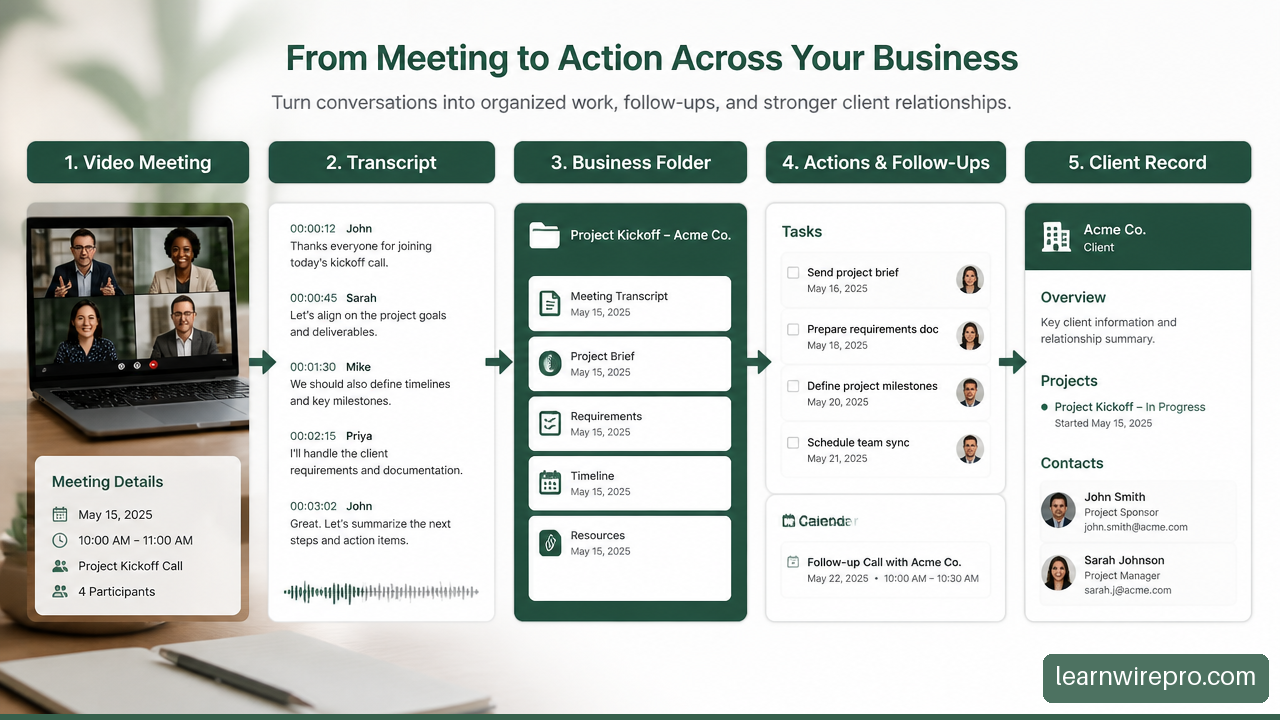
A simple post-meeting review takes less time than reconstructing a verbal commitment later. Check three items:
• Was the meeting assigned to the correct business?
• Are deadlines and commitments accurate?
• Does every action item have one next step in the central task system?
Protect Focus Across Competing Calendars
When you operate several businesses, every calendar booking is competing for the same limited supply: your attention. Reclaim.ai and similar scheduling tools can reserve focus blocks around priorities and move flexible tasks when meetings shift.
Get Alfred’s multi-workflow tool roundup includes email, calendar, follow-up, focus protection, and bookkeeping tools, which reflects a practical reality: productivity is not just writing faster. It is protecting time for work that brings in revenue while routine admin stays controlled.
Avoid letting an automatic scheduler fill every open gap. A calendar with no buffer turns one late client call into a chain reaction. Reserve time for switching between businesses, reviewing AI-generated work, and dealing with surprises. Those are not failures of planning; they are normal operating costs.
Prevent Prompt Leakage And Document Mix-Ups
Prompt leakage happens when details from one business are accidentally carried into another business’s AI workflow. This can be as obvious as pasting one client’s pricing into another client’s draft, or as subtle as using the wrong brand voice and offer details.
Use these controls before connecting AI tools to business data:
• Keep separate folders, knowledge bases, and uploaded-document collections for each business
• Use business-prefixed templates, such as Brand A Proposal and Brand B Content Brief
• Require a business identifier in every automation trigger and every task database
• Limit integrations to the minimum accounts and folders needed
• Review permissions when contractors, virtual assistants, or collaborators gain access
• Do not use AI output as final legal, financial, tax, medical, or contractual advice without qualified review
The practical recovery step is equally important. If information is routed incorrectly, stop the automation, correct the source record, remove the mistaken output where possible, and document the routing rule that failed. Otherwise, the same error tends to return quietly.
FAQ Section
What Is The Best AI Productivity Tool For A Solo Entrepreneur Running Multiple Businesses?
There is no single best tool for every operator. A general AI assistant is usually the best first purchase because it can support planning, drafting, research, and problem-solving across ventures. Pair it with an operations hub once tasks and notes begin scattering across apps.
Which AI Tools Should Be Shared Across All My Businesses?
General assistants, calendar tools, task systems, and automation platforms can usually be shared if you build clear business-level separation. Client databases, financial records, sensitive document repositories, and sales pipelines often need stricter separation because a routing mistake has higher consequences.
How Many AI Tools Do I Actually Need?
For most people, three to five tools is enough at the start: one assistant, one workspace, one automation tool, and perhaps a meeting or calendar tool. Add more only after you can name the workflow, frequency, and expected result.
Is ChatGPT Or Claude Better For Managing Several Ventures?
Choose the one that handles your most frequent work reliably. ChatGPT is often useful for broad daily support, while Claude may be a better fit for longer writing and detailed document review. If you use both, give each a distinct role to avoid duplicated work.
What Is The Best Tool For Tasks, Notes, And SOPs Across Brands?
Notion AI is a practical option when you want one central operating hub. The key is structure: separate databases or views, mandatory business tags, linked project records, and templates that identify the correct entity before work starts.
Which AI Automation Saves The Most Time?
The biggest wins usually come from repeated handoffs: inquiry to CRM record, meeting to task list, form submission to follow-up, or approved content to a publishing queue. Automating a process that happens once a month rarely beats fixing a daily inbox bottleneck.
How Do I Avoid Subscription Overload?
Review each tool monthly. Keep it if it handles a repeatable workflow, has a clear owner, and saves more value than it costs. Cancel it if another tool already performs the same job well enough. Software should reduce decisions, not create a new set of them.
Sources And References
Stack And Budget Sources
• AI Tools Capital — 9 Best AI Tools for Solopreneurs in 2026: https://aitoolscapital.com/blog/best-ai-tools-for-solopreneurs-2026
• getstacksmart.com — Best AI Tools for Solopreneurs 2026: The Complete Guide: https://getstacksmart.com/blog/ai-tools-for-solopreneurs-2026
• usecarly.com — 21 Best AI Tools for Solopreneurs in 2026: https://www.usecarly.com/blog/best-ai-tools-solopreneurs/
Workflow And Community Sources
• get-alfred.ai — 9 AI Tools Every Solopreneur Needs in 2026: https://get-alfred.ai/blog/best-ai-tools-for-solopreneurs
• Reddit — r/smallbusinessesowners discussion on AI tools for solo business owners: https://www.reddit.com/r/smallbusinessesowners/comments/1rrgw1s/which_ai_tools_help_you_stay_productive_as_a_solo/