SiteSkite
Build, edit and manage WordPress sites with AI, blueprints and sandboxes in one dashboard.
Watch my full review
- What it is
- SiteSkite is a WordPress tool that builds sites with AI, lets you test them in sandboxes, and manages updates and upkeep for connected sites. It is a management layer, not a web host.
- Pricing
- AppSumo tiers run $29, $139, $299 and $599, with 1, 10, 30 and 70 connected websites respectively.
- Best for
- Agencies, web designers and site owners who want AI to build and maintain WordPress sites and are fine using their own hosting.
- LearnWire's Rating
- 4.2 / 5
My review
Thanks for checking out my SiteSkite review, the AI tool that builds WordPress sites from a prompt and manages connected sites from one dashboard. What surprised me most was the Tech YouTube Hub jumpstart template, which produced a modern video-first site while using only a couple hundred of my 20,000 credits. It isn't a web host, though, so if you want the best AI WordPress builder for agencies using their own hosting, read on.
I wanted to try SiteSkite because it promises to build WordPress sites with AI, reuse blueprints, test in sandboxes and automate upkeep in one place. It was ranked number 2 in WordPress on AppSumo when I looked. I also have a personal reason: I've never had a good, streamlined way to get my video reviews onto my own website.
First, the hosting question
The pricing page confused me, especially the "managed storage" line. I ran the sales page through Claude, and the short answer was to plan on bringing your own hosting.
So SiteSkite is not a web host. It hosts sandbox sites while you test, then you ship to your own hosting. That is the biggest thing to understand before buying.
Building a site with AI
Inside the dashboard there are four options: Create with AI, Manage with AI, Connect a Site, and Launch a Sandbox Site. I started with Create with AI, which feels like Lovable or any other vibe coding tool.
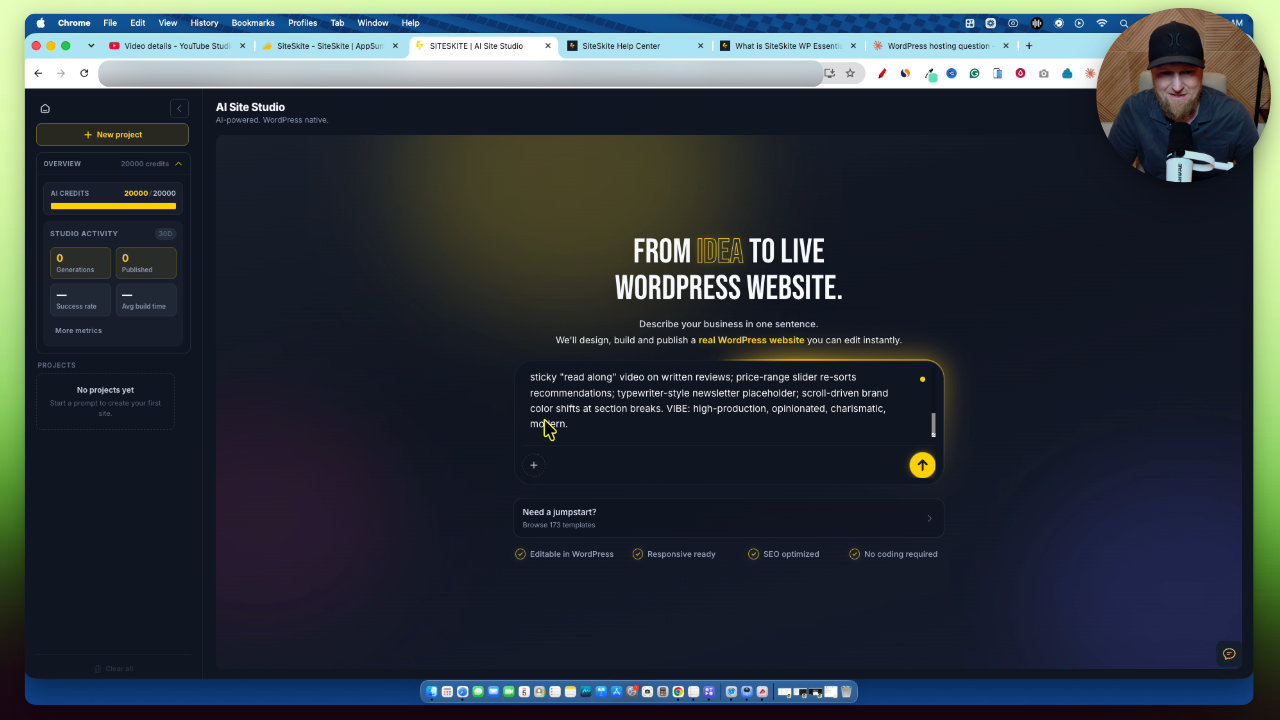
There is a jumpstart library, and one template stood out: Tech YouTube Hub. That is almost exactly what I need. It filled in a prompt for a tech YouTuber site with in-depth written reviews.
It then asked a few questions: the channel's core beat, which conversion the homepage should push, and how far the motion should go. I picked AI tools, newsletter signup, and full cinematic motion.
The result
The build finished in 14 minutes 17 seconds. You can watch the task list and elapsed time while it works, and check logs afterward.
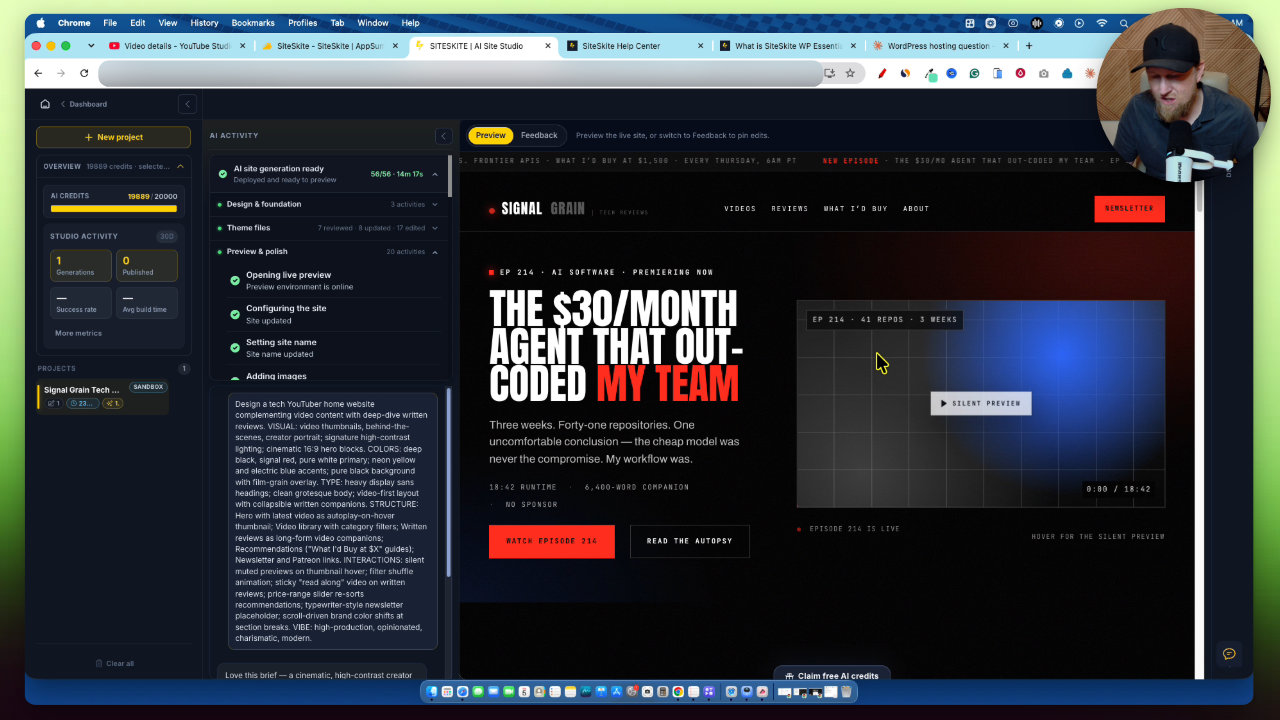
The site, called Signal Grain, looks very modern. It had a video library, reviews pages with the video and written text, a long read section and a newsletter signup. It's a video-first layout, which suits me.
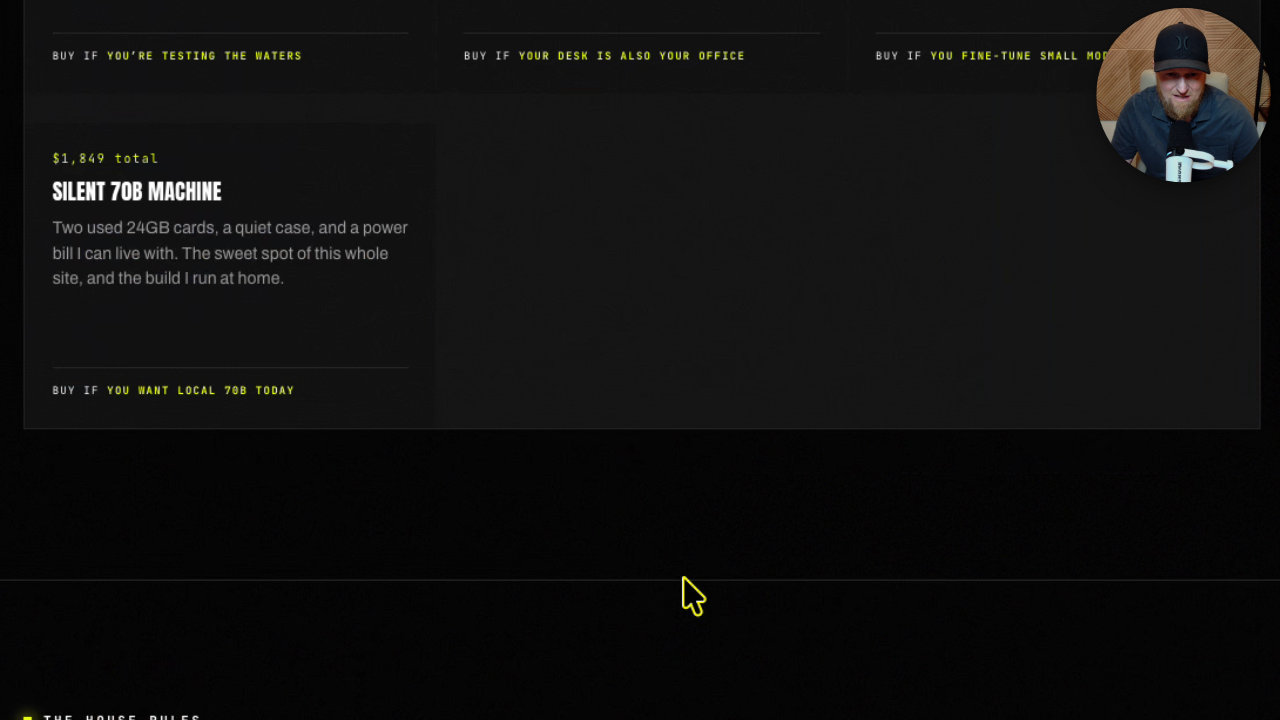
The budget page surprised me. It's built like a PC budget tool, and it gave me an idea: a tech stack budget page that recommends tools by niche. I hadn't thought of that, and the AI came up with the starting point.
Making changes
To edit, you use the feedback button, which opens a chat. I asked it to change the red buttons and text to my LearnWire green. That took 3 minutes 47 seconds, which felt slow for a color change.
The whole 14 minute build only used a couple hundred credits out of my 20,000. That gives you a good idea of how many sites and edits you can get.
Later, the design system panel opened up with a color picker. I changed a color to pink and hit apply to site, and the setting applied quicker than a prompt would. Some buttons were still off, so you'd need to tidy those up.
Sandbox, editor and publishing
The site sits in sandbox mode on SiteSkite. I checked the mobile preview, which looked good. When I opened the WordPress editor in the sandbox, it hung for a few minutes. I wouldn't use that editor anyway, since chatting in the dashboard is easier.
For export, you can publish to a connected WordPress host via the SiteSkite link plugin, download a zip with the SQL and WP content, or push to a private GitHub repo. I looked at the publish flow but didn't push my site live in this video. I'd like to do a follow-up on one of my older SiteGround sites if you want it.
I do wish they had training videos on getting a site live on hosts like SiteGround and Bluehost. The knowledge base is big, but that gap matters.
Managing existing sites
Manage with AI lets you connect an existing site and ask for things like a safe plugin and theme update, a backup, a homepage rewrite or maintenance mode. For anyone running many client sites, that's the other big selling point.
My verdict
I'm highly impressed. The output looked great, credits go a long way, and it fits what I want for my own site. My complaints are speed and the hosting setup.
It's strange to me that they host your sandbox with up to 175 GB on Tier 4 but won't host the live site. I'd love to see Tier 3 and Tier 4 include live hosting, so you skip the extra step.
I'm giving SiteSkite 4.2 out of 5 stars. I can definitely recommend it, and if you buy, I'd look at Tier 3 for white label and custom domains.
Key features
Create with AI
Type a prompt or pick a jumpstart template and it builds a full WordPress site, including the code. It has a vibe coding style layout, similar to Lovable.
Manage with AI
Connect an existing WordPress site and use AI to update plugins and themes, back up the site, rewrite copy, turn on maintenance mode and more.
Sandbox sites
New builds land in a sandbox hosted on SiteSkite so you can test and edit before shipping anything live.
Chat-based edits and design system
Use the feedback chat to change things like colors, or open the design system to set colors and apply them to the site.
Multiple export options
Publish to a connected WordPress host through the SiteSkite link plugin, download a zip with SQL and WP content, or push to a private GitHub repo.
Bring your own key
You can plug in your own API keys from tools like ChatGPT and Claude, starting at Tier 2. Monthly AI credits are included.
Knowledge base, roadmap and changelog
There is a large knowledge base, a public roadmap and a changelog inside the app.
Pricing
- 1 connected website
- 10 connected websites
- Bring your own key
- 30 connected websites
- White label
- Custom domains
- 70 connected websites
- Up to 120 AI sites per month
- Up to 175 GB sandbox storage
Pros and cons
What I liked
- Built a modern, polished WordPress site from one prompt that fit my needs well
- Jumpstart templates make good prompts easy to start with
- Credit use was low: the full build only used a couple hundred of my 20,000 credits
- Works as both a site builder and a management tool for client portfolios
- Doesn't lock you in: export via plugin, zip or GitHub
What could be better
- The build took 14 minutes 17 seconds, longer than I'd like
- A simple color change took 3 minutes 47 seconds
- It does not host live sites, so you need your own hosting
- Few walkthroughs for getting a site live on hosts like SiteGround or Bluehost
- Sandbox preview hung for a few minutes when I opened the editor
Who it's for
Agencies and web designers
If you manage many client WordPress sites, the connected-site updates, security alerts and upkeep are a big selling point.
Content creators and affiliates
A video-first review site template is a strong starting point for creators like me who publish reviews.
WordPress users tired of the old dashboard
You can make edits through a chat interface instead of the clunky WordPress UI.
Limitations: when to look elsewhere
- If you want one tool that also hosts your live site, look elsewhere, since SiteSkite only hosts sandbox sites.
- If you need fast builds, the current generation and edit times may frustrate you.
FAQ
Reader reviews
SiteSkite alternatives
 AppSumo

 AppSumo
Hostinger
A one-year AppSumo bundle with hosting, email marketing and AI agent apps for $24.